 Jev AI
Jev as a Judge: Evaluate AI Answers with Structured Scores
Use Jev as a Judge to check AI answers against evidence, build clear scoring rubrics, and compare typed evaluation with a traditional LLM judge.

An AI answer can sound helpful and still be wrong. A support assistant might promise a refund the policy does not allow. A research tool might write a convincing paragraph that its sources never support. Reading every answer yourself works for a small demo, but it becomes difficult once people use the product every day.
Jev as a Judge is one way to check those answers. You give Jev the material to review and a clear evaluation question. It returns a structured decision or score that your application can use. This guide walks through a practical example, explains the limits, and shows how to try the idea in the Jev AI Playground.
What is Jev as a Judge?
Jev as a Judge means using TypeSafe's Jev decision model as an evaluator. The phrase describes a use case, rather than a separate model you need to install. Another model might write the answer; Jev then checks a specific property of that answer, such as whether it follows a supplied policy.
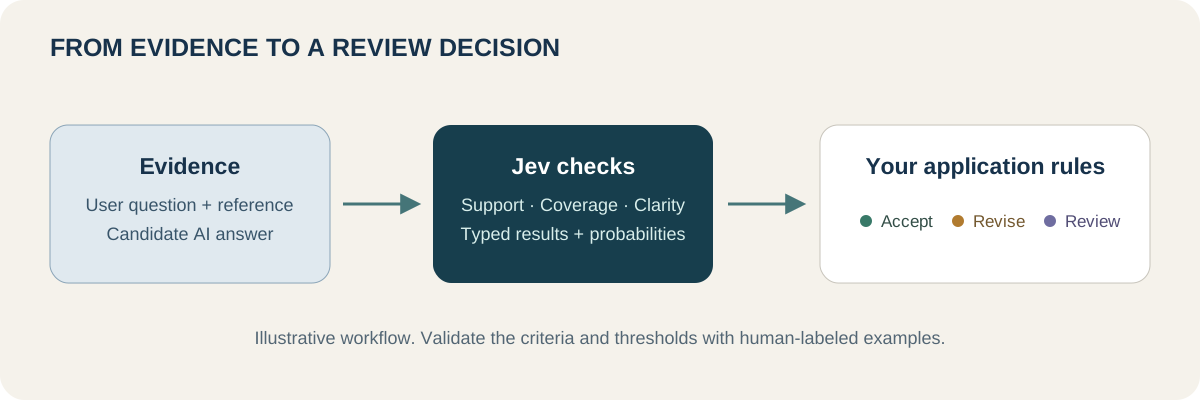
A judging request contains the state, which holds the evidence, and questions, which define the checks. A useful state might contain the original user question, relevant documentation, and candidate answer. The output is a bounded result rather than a written review. TypeSafe supports Choice, Score, and Noul questions for these judgments. See the official question reference for their return fields.
That makes Jev as a Judge useful when your product needs to act on a result. You can flag an unsupported answer, compare two candidates, or track whether a new prompt improves response quality. You still decide what counts as acceptable and what happens after the judgment.
How structured scores work
Choose the question type around the result you need. A simple failure check often needs a yes/no judgment. A quality rating needs meaningful levels. Comparing two answers needs a defined set of choices.
| Question type | Example evaluation question | How to read the result |
|---|---|---|
| Noul / Yes or No | Does the answer contain a claim unsupported by the reference? | A probability that the answer to this question is yes |
| Choice | Which answer follows the reference better: A, B, both equally, or neither? | A selected option, option probabilities, and confidence |
| Score | How completely does the answer address the user's request? | A position on your ordered rubric, with level probabilities and confidence |
For Score, write descriptions that a reviewer could apply consistently. Labels such as “poor,” “okay,” and “great” leave too much room for interpretation. A three-level completeness rubric could mean misses the main request, answers the main request but omits a requested detail, and answers all requested parts.
The returned score can fall between rubric levels. Read it with its legend; a raw API score is not automatically a percentage or a grade out of ten. TypeSafe's Score documentation explains that the number represents a position on the levels you supplied. In a Jev as a Judge workflow, the definition of those levels matters as much as the number.
A practical Jev as a Judge example
Imagine a store with this fictional return policy:
Unopened headphones can be returned within 30 days with proof of purchase. Opened headphones are eligible only if faulty. Start a return by contacting support with the order number.
The customer asks: “I opened the headphones, but they work fine. Can I return them, and how would I start?” The AI replies: “Yes, you can return any headphones within 30 days. Contact support with your order number.”
The reply sounds clear and gives the right contact step. Its eligibility claim conflicts with the policy. A single “helpfulness” rating could hide that difference, so we would use separate checks:
| Criterion | Question to ask | What a human reviewer should notice |
|---|---|---|
| Policy support | Does the candidate answer make an eligibility claim that conflicts with the reference policy? | It wrongly allows a return for an opened, working item |
| Completeness | Does the candidate address both eligibility and the next step? | It discusses both, although one part is incorrect |
| Clarity | Can the customer easily understand the candidate's instructions? | The language is clear despite the policy error |
These are illustrative human judgments, not measured Jev outputs. When you run the example, inspect the actual result. Then replace the candidate with: “Under this policy, opened headphones that work properly are not eligible. To discuss your case, contact support with your order number.” Keep everything else unchanged and compare the policy check.
This gives Jev as a Judge a concrete job. It also makes the result useful to a writer: the failed dimension is factual support, so polishing the tone would not solve the problem.
Jev as a Judge vs a traditional LLM judge
A general chat model can also evaluate answers, including through schema-constrained JSON. Jev's distinction is its decision interface: the model returns typed judgments without generating a prose explanation. The practical trade-off is between a compact result and the richer analysis you may want when investigating a failure.
| Factor | Jev as a Judge | Generative LLM judge |
|---|---|---|
| Typical output | Defined choices, rubric scores, and probabilities | A verdict, optional explanation, or structured JSON |
| Written reasoning | Does not generate a rationale | Can explain the assessment |
| Strong starting use case | Repeated, focused checks with supplied evidence | Reviews needing detailed reasoning or feedback |
| Evaluation design | Define a small judgment and its allowed outcomes | Define the rubric, output format, and reasoning expectations |
| Cost and speed | Promising for frequent checks; measure the workload | Depend on model, context, and reasoning settings |
| Verification | Compare with human labels and inspect errors | Compare with human labels and inspect errors |
For example, a content team checking whether each product answer contradicts its documentation could test Jev as a Judge first. A developer asking why a complicated algorithm is incorrect may benefit more from a reasoning model and executable tests. One system can use both: Jev screens familiar cases, and another evaluator handles difficult ones.
What do published evaluations show?
In a September 2026 MLflow evaluation, Jev 1.13.0 agreed with human labels on 30 out of 30 technical QA examples. Its median latency was 369 milliseconds, with an estimated cost of $0.0247 per 1,000 judgments. GPT-5.6 Terra and Luna also matched all 30 labels, while taking longer and costing more in that setup.
Those numbers are encouraging, but the test was small and focused on MLflow questions with supporting documentation. They do not establish a universal accuracy rate or price per judgment. Input length changes cost, and a new domain may produce different errors. The comparison also used configurations intended for quick checks, with extended reasoning disabled for the generative judges.
A separate JEV-as-a-Judge preprint, revised September 29, found a useful distinction: Jev performed better on judgments supported directly by the text than on tasks requiring mathematical, coding, or logical derivation. Its experiments also explored accepting confident judgments and escalating uncertain cases. That supports testing a mixed evaluation workflow, while the reported weaknesses on adversarial wording show why confidence alone is insufficient.
Probability, confidence, and passing are different
Suppose a Noul check asks, “Does this answer contain an unsupported claim?” A hypothetical result of 0.85 means Jev assigns an 85% probability to yes for that question. It does not mean the answer scored 85 out of 100. Here, a larger value indicates a potential problem.
Choice and Score also return a separate confidence value derived from their probability distribution. Noul does not have that extra field. Confidence describes how concentrated the distribution is; it is not a guarantee that the selected result is correct. TypeSafe recommends choosing thresholds using your own task and data. Official confidence guide
For Jev as a Judge, keep three things visible: the criterion, the returned judgment, and the rule your application applies. You might flag likely policy contradictions while sending ambiguous cases to a reviewer. Choose the boundaries after checking labeled examples. A threshold copied from someone else's demo can produce too many false alarms or miss errors your users care about.
Where Jev as a Judge fits
RAG answer evaluation. Give the judge the retrieved passages and candidate answer, then check whether the passages support the answer. Keep source quality separate: an answer can faithfully repeat an outdated document. A groundedness check alone cannot establish that the underlying source is true.
Customer-support quality checks. Evaluate policy support, coverage of the customer's request, and tone independently. A friendly reply can still fail to answer the question. Track the dimensions separately so that a better politeness score cannot hide a policy error.
Agent evaluation. Use selected tool results and the agent's final response to check observable claims. If an agent says it created a file, include evidence from the tool result. If the file's existence can be checked directly, do that in code. Reserve model judgment for questions that require interpreting language or context.
Prompt comparisons. Run old and new prompt outputs through the same rubric. Keep a sample for human review and inspect disagreements. When comparing A and B, try swapping their positions to see whether the preference remains stable. These are suggested evaluation patterns, not claims that one Jev configuration will work equally well for every task.
How to build a judge you can trust
Start with one criterion your team can label consistently. Collect good answers, clear failures, and borderline cases. Write down why each label applies before using the model. Otherwise, you may end up changing the standard to match whatever your evaluator returns.
Run Jev as a Judge on those examples and inspect both kinds of mistakes: bad answers it accepts and good answers it rejects. Refine the question or threshold using one subset, then check performance on untouched examples. Record the model version and rubric so later changes can be compared fairly. This follows the practical validation approach in HoneyHive's Jev evaluation guide.
Keep the evidence focused. TypeSafe documents weaknesses with irrelevant long context, numerical precision, complex indirection, and adversarial text. In particular, a candidate answer may contain instructions trying to influence its own grade. Test such cases explicitly and keep exact calculations in code. Jev's documented limitations
Try Jev as a Judge in the Playground
Open the Jev AI Playground and select Your own case. In Text to evaluate, paste the fictional policy, customer question, and candidate answer from the example above. Label the three sections so the model can tell the reference from the response being assessed.
Add a Yes / No question: “Does the candidate answer make an eligibility claim that conflicts with the reference policy?” Select Run Jev when the service is available and read the returned probability. Replace only the candidate answer with the corrected version and run it again. This is a live test of your input; the human observations in this article are examples, not saved API results.
Next, add a Score question for completeness using the three descriptive levels discussed earlier. Keeping policy support and completeness separate lets you see why a reply can cover the question while still being wrong. The current Playground supports these custom text decisions; a dedicated judge preset is not required. Visit our Jev examples for more question-writing ideas.
Jev as a Judge FAQ
Is Jev as a Judge a separate model?
No. It means using Jev to evaluate content against defined criteria. Our What Is Jev? guide explains the underlying decision model and its question types.
Can it explain why an answer failed?
Jev returns structured judgments, not a written explanation. Separate criteria help identify which check failed. Use human review or a generative model when you need detailed feedback about the cause.
Does a high score mean an answer is correct?
Only if the rubric measures correctness, and even then it is a model assessment. A high clarity score says nothing about factual support. Read each result against its question, evidence, and defined levels.
What should I try first?
Start with one short answer and its reference material in the Jev AI Playground. Test a clear error, correct it, and compare the result. That small exercise is a useful first step before applying Jev as a Judge to a larger collection of AI answers.
Keep exploring
 Model Comparisons
Looking for a Jev alternative? Compare Laya, Kev, Decider, Winnow, OpenJev, structured-output LLMs, and classifiers by deployment needs and practical trade-offs.
 Model Guides
Is Jev open source? Learn what is public, why the official weights are not downloadable, and how independent open source decision models compare with Jev.
 Model Guides
What is Laya MLX? Learn how the Apple Silicon port handles typed decisions, where its speed claims come from, and how it compares with Laya and Jev.
 Model Guides
What is OmniJev? A plain-English guide to its visual decision features, 0.8B, 2B, and 4B models, real limits, and how it compares with Jev and Jev-Omni.
Explore Jev AI
See a Jev decision in context.
Open the homepage Playground, compare an example, and turn your own text into a focused question when the live option is available.
Open the Jev AI Playground