 Jev AI
Is Jev Open Source? Model Weights, Public SDKs, and Local Options
Is Jev open source? Learn what is public, why the official weights are not downloadable, and how independent open source decision models compare with Jev.

You find a Jev example on GitHub, see an install command, and wonder whether you can run the model on your own laptop. That is a fair question. “Open source” can describe a client library, an API example, a server, or the model weights themselves. Those are very different things when you need to keep data on your machine or change how a model works.
Is Jev open source? The official Jev model is not available as downloadable open weights. TypeSafe AI currently serves it as a hosted decision model. Its SDKs and some surrounding tools have public source code, and independent developers have released open models with similar decision formats. Those projects are useful, but they are not copies of Jev's unpublished weights. This guide separates the pieces so you can choose a realistic path and try the Jev decision format on our homepage Playground.
What does “Jev open source” actually mean?
Most people asking about Jev open source want one of three things. They may want to inspect the code that calls the model, download Jev weights to run offline, or find a local model that answers the same kind of question. A public GitHub repository can satisfy the first goal without satisfying the other two. A compatible local server may satisfy the third goal while using completely different weights.
As of September 2026, TypeSafe's official model reference lists Jev 1.13 as a hosted model with an API name, request limits, and a text-only input specification. It does not provide an official checkpoint download or self-hosting instructions for Jev. The TypeSafe GitHub organization publishes client SDKs, skills, and an adapter, but not a Jev weight repository. That is the evidence behind the short answer above; it does not predict whether TypeSafe might change its release policy later.
It helps to use careful terms. Open-source code lets you inspect and run software under its license. Open weights let you obtain a model checkpoint for an allowed use. A hosted API gives your code access to a model through requests. One product can have a public SDK and a private model at the same time. When someone says “Jev is on GitHub,” ask which part they mean.
What is Jev designed to do?
Jev is a decision model, not a chatbot. You provide some text or text-shaped data as the state and ask bounded questions about it. A Choice question picks from listed options, Score chooses a level on an ordered rubric, and Noul gives a probability that a statement is true. The response is structured so software can use it without trying to extract a label from a paragraph.
Suppose a customer writes, “My renewal was charged twice, and I need the extra payment back.” You can ask which team should handle it, whether the customer requests a refund, and how urgent the case is under a written rule. Jev returns answers and probabilities. Your application still decides whether to route the ticket automatically, request another detail, or send it to a person. A probability is a useful signal, not proof of correctness.
Jev currently accepts text only. It does not receive a raw image, audio clip, or video in the documented model path. If a decision depends on a picture, you need to convert relevant evidence into text or use a different model with visual input. That limitation matters when a search for “Jev open source vision model” mixes the official Jev service with independent multimodal projects.
Which Jev pieces are public?
The easiest way to avoid confusion is to separate the model, the access layer, and independent replacements.
| Piece | Publicly available? | What it lets you do |
|---|---|---|
| Official Jev model weights | No public official download found | Use Jev through the hosted service, not by loading its weights locally |
| TypeSafe Python and JavaScript SDKs | Yes, public repositories | Write applications that call the official API |
| TypeSafe System One adapter | Yes, public repository | Compare the same request shape against supported LLM providers |
| Independent Jev-style models and servers | Varies by project and license | Run a similar decision workflow using different weights or code |
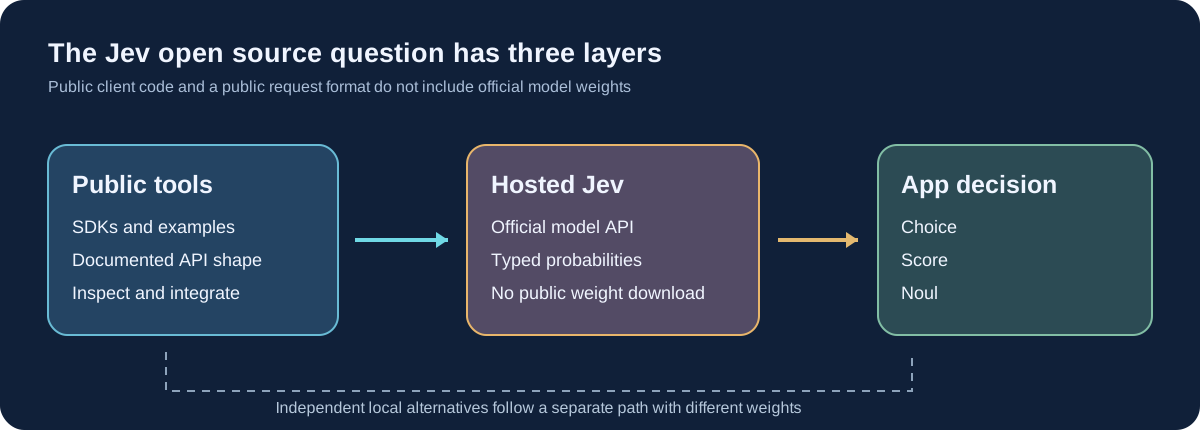
The official Python SDK is an example of the public access layer. Its repository shows how a client sends a state and typed questions. Publishing that code is valuable: developers can inspect request handling, integrate the API, and build tests around it. The SDK still calls a hosted model. Installing the SDK does not install the Jev checkpoint or make the model work offline.
The distinction also applies to compatibility projects. A server may accept a Jev-shaped request and return fields with familiar names. That makes comparisons easier, but it does not guarantee identical answers, probability calibration, latency, or license terms. “Jev-compatible” describes an interface, not ownership of Jev's weights.
Why do people look for an open source Jev?
The reason often matters more than the label. A support team may want customer messages to stay on its own servers. An open source model with downloadable weights can make that possible, provided the rest of the application also runs locally. An engineer may want to inspect how a decision is made, change the model, or repeat a benchmark. For that goal, a public client library is not enough; the model files and evaluation method matter too.
Another developer may only want to understand the request format before writing code. The public Jev SDK and documentation can answer that need without an open source Jev checkpoint. Someone who wants to fine-tune for a narrow task should look for an independent project that publishes weights and a training path. These are different jobs, so “find an open source Jev” is not one simple shopping question. Write down the part you need to control before picking a project.
Jev vs open-source alternatives
If your real goal is local inference, several independent open source projects are worth understanding. Laya offers open weights for short typed text decisions. OpenJev is a separate Jev-compatible decision server built around an open DiffusionGemma model. Kev publishes Jev-like decision checkpoints built on Qwen backbones. Their licenses and hardware needs belong to each project, so check the exact release you plan to run.
| Option | Who provides the decision model? | How you use it | Main trade-off to test |
|---|---|---|---|
| Jev | TypeSafe AI | Hosted API; official weights not published | Longer text support without operating model hardware, but no local official checkpoint |
| Laya | Convai Innovations | Open weights on hardware you manage | Small models and local control; short default contexts and task-specific quality |
| OpenJev | Independent project using DiffusionGemma | Run its documented server and model | Jev-like API shape, but a larger deployment and separate behavior |
| Kev | Independent Qwen-based model family | Run or train released checkpoints | Several sizes and local options; choose hardware and validate each checkpoint |
This is a map of choices, not an accuracy leaderboard. The Laya project, OpenJev server, and Kev release document different training data, evaluation sets, and hardware. A model can look strong on a three-label topic test and struggle with a 77-option support queue. Another may return sensible top labels but probabilities that need recalibration on your data. One site's “fastest” number may exclude network time while another includes it.
For more focused reading, see our OpenJev guide and Jev vs Laya comparison. Those articles cover the individual projects without treating them as official Jev releases.
How should you compare Jev with a local model?
Start with a task that has a known answer. Write the same state, question, and options for each model. For example: a batch of real support tickets, each labeled with the team that actually resolved it. Include cases where no listed team is right and add an Other or Needs review option. If your labels overlap, fix the labels before deciding which model “wins.”
Then check more than the top answer. Count mistakes by category, inspect cases where two options are close, and ask whether high-confidence answers really are more often correct. If a decision triggers a refund or account change, set a review threshold using your own labeled examples. An open model does not become reliable because its code is public; a hosted one does not become reliable because the response is neatly formatted.
Measure speed from the user's point of view. A local model has loading, tokenization, and hardware costs. A hosted request has network and queue time. Keep the input length and question count the same, and record the full time to a usable decision. Compare running costs too: local weights avoid per-request model fees but still need a machine, setup, updates, and monitoring.
Finally, check the license for the specific code and weights you use. “Open source” in a search snippet is not enough to establish what your team may redistribute, modify, or use commercially. This matters most when an independent server, a base model, and a decision adapter come from different authors.
Try the Jev decision format here first
You can see the workflow before choosing a deployment route. Go to the Jev AI homepage Playground, select Your own case, and paste a short text example. Ask a Choice question such as “Which team should handle this?” with distinct options, then add a Yes / No or Score question if it helps. Press Run Jev when the service is available and read the returned probabilities.
Change one fact and run the same question again. If “I was billed twice” becomes “I cannot sign in,” the routing choice should be worth inspecting. This small experiment helps you write a clear decision rubric. Save the question and expected answer so you can later compare Jev with an independent open source model on the same cases.
The homepage Playground runs Jev, not the independent open alternatives in the table. It is a way to test the Jev interface and your question design, not a hidden local-weight download. Our What Is Jev? guide explains the three answer types, and the examples page offers more practical cases.
Jev open source FAQ
Can I download the official Jev weights?
No public official Jev checkpoint or self-hosting path appears in TypeSafe's current model documentation. The official Jev model is accessed through a hosted service. Public SDK code should not be mistaken for model weights.
Is the Jev API itself open source?
The documented request and response shape is public, and TypeSafe publishes SDK and adapter code. An API format is not a model license. You can inspect the client repositories without gaining the right or files needed to run the official Jev model locally.
Is Laya an open source version of Jev?
No. Laya uses independently developed weights. It answers similar typed questions, so it can be a useful local comparison, but it is not Jev and does not reproduce Jev's answers by definition.
Is OpenJev the official open version of Jev?
No. The OpenJev project described here is independent. Its Jev-compatible server uses different open weights. Check the repository author and license because other unrelated projects also use similar names.
Where can I try Jev now?
Open the Jev AI homepage Playground and run a text case when the service is available. Try a clear Choice, Score, or Yes / No question, then use the result to build a small evaluation set before choosing a hosted or local route.
Keep exploring
 Model Guides
What is Laya MLX? Learn how the Apple Silicon port handles typed decisions, where its speed claims come from, and how it compares with Laya and Jev.
 Model Comparisons
Compare Jev AI, Djev, Laya, OpenJev, and SemIf through real decision tasks: typed answers, images, local control, probability quality, and setup effort.
 Model Comparisons
Jev vs Laya explained: compare typed outputs, open weights, context, benchmark results, and practical trade-offs. Explore Jev decisions in the Jev AI homepage Playground.
 Model Guides
What is OpenJev? Learn how this open-source decision server turns a state and typed questions into probabilities, how it differs from Jev, and what to test before using it.
Explore Jev AI
See a Jev decision in context.
Open the homepage Playground, compare an example, and turn your own text into a focused question when the live option is available.
Open the Jev AI Playground