 Jev AI
What Is Jev Router? Smarter Model Choices for Every Chat Request
Learn what Jev Router does, how its model and reasoning choices work, how to connect through an API, and when to choose Jev or another router instead.

A student asks an AI assistant to fix a typo. Five minutes later, the same conversation turns into a difficult coding problem. Sending both requests to the same model with the same reasoning effort is simple, but it may waste time on the easy job or leave the hard one underpowered. Jev Router is meant to make that choice for each request.
The name can be confusing. Jev is also a structured decision model, and “router” can mean anything from a hand-written if statement to a service that picks among dozens of chat models. This guide is about TypeSafe's typesafe/jev-router listing on OpenRouter. It explains what the product claims, how to try the API, what still needs testing, and how it differs from the Jev decisions you can use on this site's homepage.
What is Jev Router?
Jev Router is a chat model routing entry point. Your application sends a normal conversational request using the model ID typesafe/jev-router. The router chooses a downstream model and a level of reasoning effort for that request. The chosen model writes the answer. As the conversation changes, the router can reconsider its choice rather than treating the first turn as a permanent decision.
That is how the Jev Router listing describes it: balance answer quality, speed, and cost across requests. The listing says the routing itself runs on Jev, TypeSafe's System One decision model. It does not say every answer is generated by Jev. The distinction matters because the output you receive from the chat route is generated text, while a direct Jev decision request returns bounded choices or scores for a question you define.
Think of a campus help desk. A quick “Where is the library?” query may need a fast, inexpensive response. A long question about a complicated application form may deserve more careful reasoning. Jev Router tries to assign an appropriate chat model to each case. Whether it makes the right trade-off for your audience is something you should measure with your own examples.
How does Jev Router work in practice?
The public description gives a clear purpose but not a full recipe for every routing decision. It says Jev Router picks a model and reasoning effort per request, accounts for quality, speed, and cost, and adapts as a conversation evolves. It does not publish a fixed list of winning models for each prompt type or a guarantee that the cheapest route will always be selected.
From an app developer's view, the flow is straightforward: send messages to the router ID, let it choose a downstream model, then read the text response. Keep the returned model and usage information with each test case when your API response provides it. That way, “the router felt faster” can become a comparison of actual latency, output quality, and cost for a set of requests.
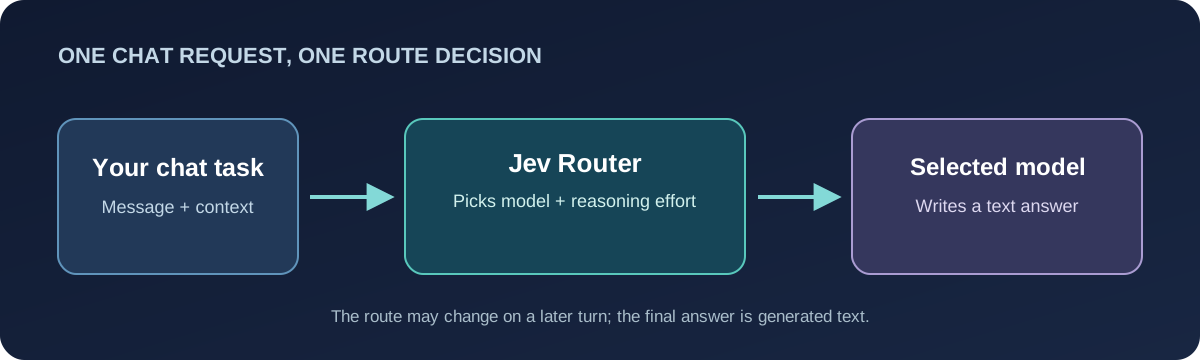
There are practical reasons to route request by request. A support conversation may begin with a shipping question and later need careful reasoning about an exception. A router can adapt without making your team maintain every selection rule.
That convenience has a cost in predictability. If the downstream model changes, style, tool behavior, latency, or the way an answer is phrased may change too. For a tightly controlled workflow, test multi-turn conversations, not only isolated prompts. If a specific model's behavior is required for compliance or reproducibility, a fixed model may be easier to manage.
What are Jev Router's main features?
One model ID for a changing workload. The app calls typesafe/jev-router instead of picking a separate chat model ID every time. That reduces model-selection code in a prototype, especially when users bring many kinds of questions. It does not remove the need for an app-level policy about privacy, budgets, or when a human should review an answer.
Variable reasoning effort. The listing says Jev Router chooses reasoning effort as well as the downstream model. An easy lookup should not need the same work as a hard planning task. The public page does not spell out every effort tier or expose a per-task decision trace, so avoid designing a product around an undocumented tier name.
Conversation-aware routing. A useful router should notice when a chat becomes harder. Jev Router specifically says it adapts as the conversation evolves. To test that claim, send a short sequence with a simple opening and a harder follow-up. Compare the selected model, elapsed time, and answer quality across turns. A single “hello” prompt tells you very little.
Broad catalog-level input support. OpenRouter lists text, images, audio, PDFs, and video as Jev Router inputs, with text as output. It also shows a 1,000,000-token context window for the routing entry. These are useful discovery details, but they are not a promise that every downstream model accepts every file type or can effectively use a full million-token conversation. Test the exact format and length you plan to send, and check the current model page before launch.
A simple pricing listing. The Jev Router page currently displays zero prompt and completion token prices for this entry. Treat a catalog figure as a starting point for a budget check, not a lifetime price guarantee. Pricing and the selected route can change. Before sending production traffic, inspect the current terms, response metadata, and actual account usage for your workload.
How do you connect to the Jev Router API?
The TypeSafe model catalog on OpenRouter says its models are available through an OpenAI-compatible API. For Jev Router, use the chat-completions endpoint and set model to typesafe/jev-router. Here is a minimal server-side request:
curl https://openrouter.ai/api/v1/chat/completions \
  -H "Authorization: Bearer $OPENROUTER_API_KEY" \
  -H "Content-Type: application/json" \
  -d '{
    "model": "typesafe/jev-router",
    "messages": [
      {"role": "user", "content": "Explain this JavaScript error in plain English."}
    ]
  }'
Create an API key through your provider account, store it on your server, and send requests from there. A browser or mobile app should call your own backend, which holds the key and can apply usage limits. Do not put a provider key in public client code. The example sends one text message so you can verify the basic path before trying files or long conversations.
For a useful integration test, save the prompt, response, selected model when shown, token usage, elapsed time, and any error. Repeat with a factual question, a complex explanation, a coding problem, and a follow-up that changes the task. This can expose a quick but weak route or a good answer that arrives too late.
If your product depends on JSON fields, function calls, or a particular media type, verify those features on the routes your requests actually take. A general chat response and a typed Jev decision are different contracts. Do not assume Jev Router will return Choice, Score, or Yes/No probabilities simply because Jev helps power its routing.
Jev Router vs Jev vs other routing options
The TypeSafe catalog lists Jev Router, Jev Latest, and Jev 1.13 as separate entries. Jev Latest points to the newest model in the Jev decision family. Jev 1.13 is a structured decision model. Neither is simply another name for the chat router.
| Option | Main job | What you send | What you get | Best first use |
|---|---|---|---|---|
| Jev Router | Choose a chat model and reasoning effort per request | Conversation messages | Generated text from a selected downstream model | Mixed chat tasks where route flexibility matters |
| Jev / Jev Latest | Answer a bounded decision question | State, question, and allowed answers | Typed decision probabilities or scores | Classification, triage, approval gates, or ranking |
| OpenRouter Auto Router | Choose a chat model using task classification and recent community spending patterns | Conversation messages | Generated text from a selected downstream model | Comparing a documented, market-based routing approach |
| Fixed chat model | Use the model your app names explicitly | Conversation messages | Generated text from that model | Stable behavior and direct model-level testing |
The OpenRouter Auto Router documentation describes task classification, recent aggregate spend share, cost tiers, and fallbacks for openrouter/auto. Jev Router has a different published description: it says Jev selects a model and reasoning effort and responds to changes in a conversation. There is no public head-to-head result here showing that one router is universally faster, cheaper, or more accurate. Measure them on the same prompts, account settings, and time window if that choice matters to you.
Jev itself solves another problem. Imagine a support ticket that must go to Billing, Technical Support, or Human Review. A direct Jev decision can score those explicit choices. A chat router can choose a model to write a reply about the ticket, but that does not automatically give your software the same controlled decision format. Our What Is Jev? guide explains that distinction in more detail.
When should you use Jev Router?
Start with Jev Router if your app receives varied conversational requests and you want to test whether dynamic model choice improves the experience. It is especially interesting when the difficulty of a conversation changes midstream. Write down what “better” means first: perhaps a correct answer within five seconds for short questions, a useful explanation for harder ones, and a cost ceiling across the whole test set.
Choose a fixed chat model if consistency is the main goal. A fixed model gives you a clearer baseline and fewer moving parts when investigating a bad answer. Choose direct Jev when your software needs a bounded result, such as a routing category or risk level, rather than prose. These patterns can also live in one product: a typed decision can decide what happens next, while a chat model writes the message a user will read.
For serious evaluation, include ambiguous requests, follow-up corrections, long context, and cases where the assistant should admit uncertainty. Compare failure rates as well as speed. Easy prompts alone make almost any router look good; hard prompts alone may hide its everyday value.
Try the Jev decision idea on our homepage
You can try the decision side of this idea now in the Jev AI homepage Playground. Choose Your own case, describe a short, non-sensitive situation, and ask a focused question with clear options. For example: “Should this ticket go to Billing, Technical Support, or Human Review?” Run Jev, then change one fact in the case and see whether the result changes for a sensible reason.
This Playground uses Jev for structured text decisions; it is not a live Jev Router demo. The Jev Router chat entry is not currently connected to this site's Playground. The exercise still helps you prepare a routing problem: write a good question, name the allowed outcomes, and decide when a person should review the answer. Our Jev examples page has more cases you can adapt.
Jev Router FAQ
Is Jev Router a model or a router?
It is listed as a model ID in an API catalog, but its purpose is to route chat requests to a selected downstream model and reasoning effort. The final answer is generated text. Direct Jev is the model family for typed decisions.
Is Jev Router free?
The current Jev Router listing shows zero prompt and completion token prices for the entry. Check the live pricing and your account's actual usage before assuming a particular production cost. A price shown today can change, and the listing alone is not a full budget forecast.
Can Jev Router handle images or very long prompts?
Its catalog lists image and other media inputs and a one-million-token context window. Test your actual file type and prompt length end to end. Routing to different downstream models may affect what works well in practice.
Can I run Jev Router on this website today?
Not yet. The homepage Playground currently runs Jev text decisions, which you can use to try the choice-and-score workflow. This article explains the separate chat router so you can decide whether it fits your application when an integration becomes available.
Keep exploring
 Model Guides
Is Jev open source? Learn what is public, why the official weights are not downloadable, and how independent open source decision models compare with Jev.
 Model Guides
What is Laya MLX? Learn how the Apple Silicon port handles typed decisions, where its speed claims come from, and how it compares with Laya and Jev.
 Model Guides
What is OmniJev? A plain-English guide to its visual decision features, 0.8B, 2B, and 4B models, real limits, and how it compares with Jev and Jev-Omni.
 Jev Guides
Learn what JevBench measures, how to read its four scores and model rankings, why sealed tests matter, and how to check a real decision in the Jev AI Playground.
Explore Jev AI
See a Jev decision in context.
Open the homepage Playground, compare an example, and turn your own text into a focused question when the live option is available.
Open the Jev AI Playground