 Jev AI
Laya AI: Fast Local Decisions with Multilingual Routing
What is Laya AI? Explore its three open-weight decision checkpoints, typed answers, language routing, practical limits, and how it compares with Jev.

Laya AI helps software make small, defined decisions. Give it a message or document, ask a question, and list the possible answers. It returns a structured answer with probabilities. For example, it can help sort a support request, but it will not write the reply.
Laya AI is an open-weight model family from Convai Innovations. Jev, from TypeSafe AI, tackles a similar kind of task through a hosted model. Below, we'll look at Laya AI's models, where they differ from Jev, and what to test before using either one. You can try the decision format in the Jev AI homepage Playground; it currently runs Jev, not Laya.
What is Laya AI, in plain English?
Imagine a help desk asking, “Which team should handle this request?” You give Laya AI the message and a short list of teams. It picks from that list and returns probabilities. Your app then decides whether to route the ticket or send it to a person for review.
Laya AI has three published checkpoints: English, multilingual, and one trained further for typed decisions. Its GitHub repository also includes a Router that chooses a checkpoint based on the input. The model card lists the code and weights under Apache-2.0. You can run the models on your own infrastructure, though you will need to manage hardware, updates, and testing.
The project calls this a “System 1” model: it gives a quick answer to a focused question instead of writing a long response. A fixed answer list stops it from inventing a new category, but it can still choose the wrong one.
How does a Laya AI decision work?
Say a customer writes: “The export says complete, but the file is empty. We need the report tomorrow.” That message is the state. A Choice question might select technical issue, billing, or other. A Score question could rate urgency. A Noul question asks for a yes/no judgment, such as whether the export finished but produced an unusable file.
Laya AI scores the allowed answers in one model pass rather than generating a long reply word by word. This can make a narrow decision fast. The speed shown in a model demo will still differ from the time a user sees in a full app, where network and other work add delays.
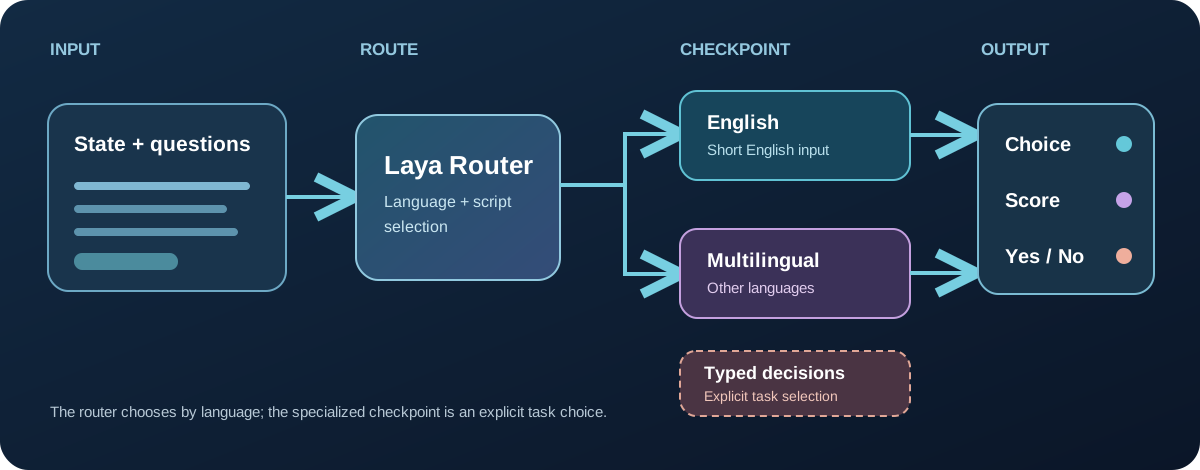
Choice picks from named options. Score rates something against an ordered scale. Noul gives a probability for a yes/no statement. The app should still decide what to do with the result, especially when the answer is uncertain.
Clear questions help. “Is the export unusable because the file is empty?” is easier to judge than “Is this bad?” Add an other option if the list might miss a case. This advice applies to Jev as well as Laya AI.
That last option is easy to overlook. Suppose the only choices are billing and technical issue, but the customer is asking to change their account details. The model must pick one of two poor answers. Add other, and the app can send the request to a general queue instead. You should also decide what happens when the top two choices are close. For a low-risk ticket, a suggested route may be enough. For a refund or account change, a person may need to check it first. The useful part of Laya AI is not just the label; it is having an answer your app can handle in a predictable way.
Which Laya AI model should you choose?
There are three published Laya AI checkpoints. The table gives you a starting point; check the model card for current limits before choosing one for production.
| Checkpoint | Core design | Default context | Starting point |
|---|---|---|---|
laya | 421M-parameter ModernBERT-large based English checkpoint | 512 tokens | Short English routing, triage, and classification experiments |
laya-multilingual | 322M-parameter mmBERT-base based checkpoint | 1,024 tokens; can be raised to 8,192 with an explicit setting | Mixed-language or non-English text, with language-by-language testing |
laya-typed-decisions | 421M-parameter checkpoint specialized for published typed-decision workflows | 1,024 tokens | Workloads close to its training and evaluation tasks, with separate validation |
Start with language. The English checkpoint may struggle with other scripts. The Router sends non-English input to the multilingual checkpoint, but short messages can be hard to identify. Test the languages your users actually write.
Check input length too. The stated token limits include the message, question, and options. The multilingual checkpoint can be configured for up to 8,192 tokens, but longer input takes more time. A long document may work better if you first select the relevant passage.
Match the task. The specialized checkpoint was trained for particular decision workflows. Its published score may not carry over to your customer messages. Compare it with the base model on examples from your own work, especially if you have many possible labels.
Laya AI vs Jev: what is the practical difference?
Laya AI and Jev come from different teams, although both use typed questions. Laya AI offers open weights and several checkpoints you can run yourself. Jev is hosted and supports longer text inputs. See the TypeSafe model reference for Jev's current limits.
| Question | Laya AI | Jev | General chat model |
|---|---|---|---|
| What does it return? | Typed Choice, Score, and Noul answers with probabilities | Typed Choice, Score, and Noul answers with probabilities | Prose or structured output, depending on the model and request |
| Where does it run? | On infrastructure you choose for its published weights | Through a hosted model endpoint | Hosted or local, depending on the product |
| What needs management? | Checkpoint, language routing, hardware, calibration, upgrades | API connection, version choice, evaluation | Model selection, prompt and output validation, often more generated tokens |
| How long can the input be? | Short defaults; multilingual can be configured for longer input | Current TypeSafe documentation lists 64k tokens per request, with a separate state-plus-longest-question limit | Varies widely by model |
| When is it attractive? | Local control and a narrowly tested decision workload | A managed decision workflow or longer text without self-hosting | Explanations, drafting, conversation, and open-ended tasks |
| Is it running in this site's Playground? | No | Yes, through the site's Jev decision flow when available | AI chat is a separate page |
This is a guide to choosing a workflow, not an accuracy ranking. Laya AI may suit a team that wants to run the model in its own environment. Jev may be easier to try if you want a managed service or need longer inputs. Test both on the same examples before comparing speed or accuracy.
The choice also depends on who will maintain the system. With Laya AI, your team has to pick a checkpoint, run it, and watch for problems after an update. With Jev, you still need to design good questions and check the answers, but you do not manage the model hardware. A general chat model is useful when the task needs an explanation or a draft, yet its extra writing ability may not help with a simple three-way choice. It is reasonable to use different models for different steps: one to route a request and another to write a reply.
What do Laya AI benchmarks actually show?
In a published test of 2,000 typed decisions, laya-typed-decisions scored 0.766 for top-answer accuracy. The base English checkpoint scored 0.362 on the same set. The specialized model had been trained further on this kind of workflow, so its score does not describe every Laya AI model or every task.
That comparison lists a published Jev score of 0.727, but the figures were not produced in one controlled run. Jev also does better on a measure of how closely the full probability distribution matches the reference. If your app uses probabilities to decide when a person should step in, that matters as much as the top answer. The Jev vs Laya comparison looks at more examples.
Laya's documentation notes that its base checkpoints can be overconfident. If a model says “90%,” check whether it gets about nine out of ten similar cases right on your data. A high probability alone is not a reason to automate an important decision.
Where does Laya AI fit in a real workflow?
Support triage is a good first project. Messages are short, teams are easy to list, and you can check the model's choice against past tickets. Send uncertain cases to a person. A routing model will not write the customer reply.
Moderation and policy review need more care because mistakes can affect users. Write clear criteria, check errors by category, and keep a review path. Use ordinary code for rules that are exact; use Laya AI to interpret the messy wording around them.
Agent routing could use choices like search, ask a question, or finish. But a “finish” answer is not proof that a file was saved or a task succeeded. Check the real result before the app moves on.
For any of these uses, keep a small test set with the original text, the question, allowed answers, expected answer, and model result. Include tricky cases: mixed languages, missing categories, and long messages. Run the same set again when you change models or questions.
You do not need a huge benchmark to find early problems. Start with cases your team already understands, then look closely at every wrong answer. Was the question vague? Were two labels too similar? Was the right answer missing? If the same kind of mistake keeps appearing, fix the question or the workflow before adding more automation. This is a more useful first step than copying a speed claim from a demo, because it tells you where the model will struggle in your own product.
Try the decision workflow on Jev AI
To see what a typed decision feels like, visit the Jev AI homepage Playground. Open Your own case, paste a short message, and ask a Choice, Score, or Yes / No question. Then use Run Jev to inspect the result when the service is available. Try changing one detail in the message and run it again.
The Playground currently runs Jev, not Laya AI. Still, you can use it to write a clear question and answer list, then reuse those inputs when you test Laya AI separately. New to the format? Start with the What Is Jev? guide.
For a first try, ask “Which of these three teams should review this request?” Include other as an answer. That gives you a question you can repeat and compare.
Frequently asked questions about Laya AI
Is Laya AI a chatbot or a general LLM?
No. Laya AI picks or scores defined answers. It does not draft an email or hold a conversation.
Is Laya AI the open-source version of Jev?
No. They have different developers and model weights. Their similar question types make comparison useful, but they are separate projects.
Does Laya AI work in languages other than English?
Yes, through the multilingual checkpoint and Router. Accuracy can vary by language and task, so test the languages your users send.
Where can I find the Laya AI models and code?
The project's GitHub repository links to its checkpoints and usage examples. If you search for “laya github,” check that you are reading the Convai Innovations Laya project rather than another project with a similar name. Review the model card and license before setting up a local test.
Keep exploring
 Model Comparisons
Compare Djev and Jev for typed AI decisions: text and image inputs, speed, probability quality, deployment, and the right way to test them on your own cases.
 Model Comparisons
A practical Jev vs JevK5 guide covering typed answers, open weights, input limits, published tests, and how to try a real decision in the Jev AI Playground.
 Model Comparisons
Jev vs Laya explained: compare typed outputs, open weights, context, benchmark results, and practical trade-offs. Explore Jev decisions in the Jev AI homepage Playground.
 Model Guides
What is Jev? Learn how the Jev AI model turns text into typed decisions, which Jev model names matter, how it compares with chat models, and where to try it on Jev AI.
Explore Jev AI
See a Jev decision in context.
Open the homepage Playground, compare an example, and turn your own text into a focused question when the live option is available.
Open the Jev AI Playground