 Jev AI
What Is Winnow? Local AI Decisions, Chat, and Vision Explained
A plain-English guide to Winnow-12B, its local typed decisions, Q8 and BF16 builds, vision support, JevBench results, and how it compares with Jev.

Winnow is a local AI model built to make structured decisions while keeping the chat and image abilities of its base model available. Picture a small returns team. A customer sends a message and a photo of a damaged chair. The team needs a route for the case, a damage judgment, and perhaps a written reply. Winnow-12B tries to handle those jobs with one set of loaded weights. That combination is its most interesting feature—and the reason it needs a careful comparison with Jev, a model focused on text decisions.
The name “Winnow” can also refer to an older machine-learning algorithm or unrelated software. Here it means EldanRing's Winnow-12B, the model listed as Winnow-12B Q8 on JevBench. This guide explains what Winnow does, what the published tests actually show, and when a local setup makes sense. If you mainly want to see how a decision question works, you can start with Jev in the Jev AI homepage Playground.
What is the Winnow-12B model?
Winnow-12B is an independent fine-tune of Gemma 4 12B IT. Its creator trained a LoRA update for typed decisions, merged that update into the model, and released ready-to-load GGUF weights. The Winnow model card describes a llama.cpp-based server that can accept a Jev-shaped decision request as well as an ordinary chat request. Winnow is not an official Jev release and does not use TypeSafe AI's weights.
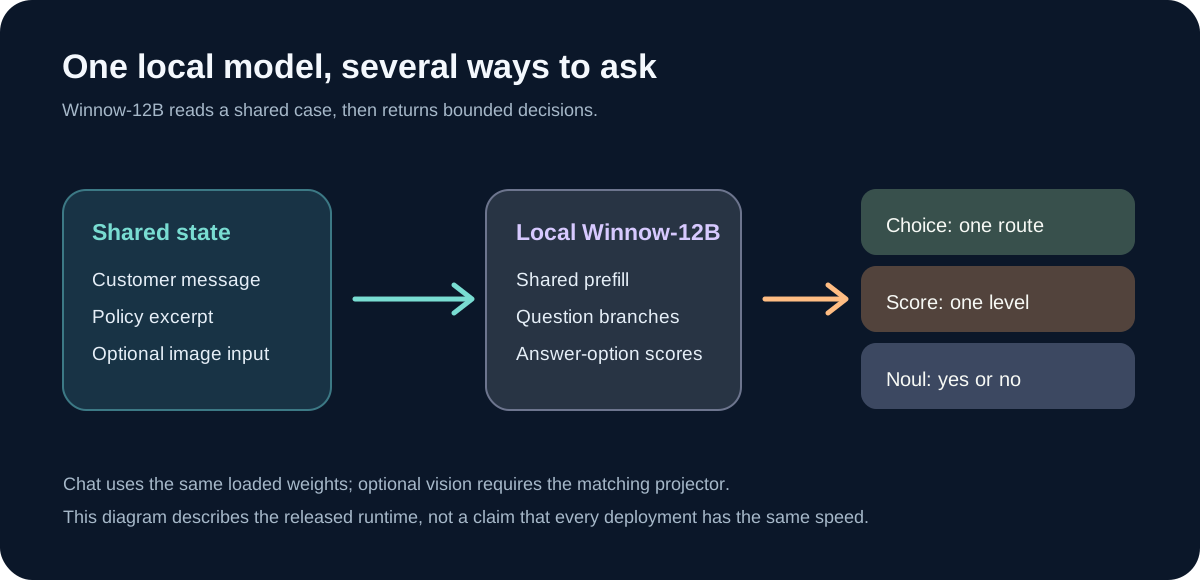
A typed decision starts with state: the text or structured facts the model should consider. You add a focused question and the allowed answers. A Choice question picks a category such as Damaged, Wrong item, or Other. A Score question selects a level on a defined scale. A Noul question asks for a yes-or-no judgment. Instead of writing several sentences and asking your software to find the answer inside them, Winnow reads scores for the allowed options and returns a bounded result.
The local runtime can read shared state once and branch into several questions. That can be useful when a case needs more than one label. A returns team might ask whether damage is visible, which queue should receive the case, and how urgent it is. Chat is a separate request path on the same loaded model. Image input needs Winnow's matching vision projector; text-only decisions do not. These paths share weights, but the published 64K setup gives chat and decisions turns with their memory contexts. Switching tasks may remove a cached prefix, so “one model for everything” does not mean every kind of request is served at once without a cost.
What do Q8 and BF16 mean for Winnow?
You will usually see two Winnow-12B downloads. Q8_0 stores the weights at 8-bit precision and is about 12.67 GB as a file. BF16 uses 16-bit floating-point weights and is about 23.83 GB. They are two exports of the same merged fine-tune, not pieces you need to combine. The Q8 file is the one used for Winnow's 16 GB RTX 5070 Ti demonstration. BF16 weights alone are larger than that card's memory, so it needs a different hardware or offload plan.
The Q8 demonstration configured a 65,536-position context with an image and measured a peak of 15.01 GiB of device memory. That is a useful proof that a particular setup worked, not a guarantee that every 16 GB computer will handle every workload. The host also had substantial system RAM. A near-full, cold four-question request took 25 seconds in that test, while repeated cached requests were much faster. Context length tells you what fits; it does not tell you how long a fresh, large request will take or how well the model reasons across all of it.
Winnow's model card says the chat and image paths function in its release runtime. It also says a full paired comparison of general chat quality against the original Gemma model was not completed. Audio and video were not evaluated. That distinction matters if a page promises “multimodal” work: tested image input is a real feature, while strong general chat quality or audio understanding should not be assumed from a decision benchmark.
Winnow vs Jev: the main differences
| Question | Winnow-12B Q8 | Jev 1.13.0 |
|---|---|---|
| Who makes it? | EldanRing's independent Gemma-based fine-tune. | TypeSafe AI's Jev decision model. |
| Where does it run? | On hardware you operate with its local inference server. | Through a hosted API. |
| What input can it handle? | Text decisions; optional image input with the matching projector; chat requests through the same loaded model. | Text or structured text fields for decisions; no direct image input. |
| What does a decision return? | Choice, Score, or Noul answers from option scores. | Choice, Score, or Noul answers with model probabilities. |
| Published capacity | A 64K Q8 profile was tested on a specific 16 GB GPU setup; the benchmark used an 8,192-position configuration. | 64K tokens per request, with 32K for state plus the longest question. |
| Who manages the model? | Your team handles hardware, serving, upgrades, and testing. | The service operator runs the model; your team still designs and tests requests. |
| Can you try it in this site's Playground? | Winnow is not currently connected here. | Yes, when the Jev service is available. |
The Jev limits and text-only input come from TypeSafe's model reference. The two context figures are not perfectly equivalent: Jev publishes an API request budget, while Winnow reports a tested local runtime configuration. Neither number promises that the model will find a detail hidden in pages of unrelated material. For a policy decision, give the relevant policy passage first and then test longer cases separately.
What do the Winnow benchmarks really say?
Two published comparisons answer different questions. Winnow's own benchmark report tested 231 public JevBench items. Winnow Q8 and hosted Jev each answered 198 of 231 correctly, or 85.71%. That result is interesting: the smaller, local comparison found a tie on those items. It does not say Winnow and Jev are equally good on every kind of decision. The same report found Jev ahead on its separate 1,046-item clean Kev-v9 set, 87.00% versus 81.55% for Winnow Q8.
The broader, independent JevBench v1.4.2 board used 534 public and 308 sealed decisions. On its official score, Jev 1.13.0 scored 63.3 and ranked second; Winnow-12B Q8 scored 55.6 and ranked sixth. Jev had higher intelligence and calibration scores. Public accuracy was 86.6% for Jev and 85.7% for Winnow; sealed accuracy was 36.7% and 33.1%. The sealed questions were difficult for both systems, so a team should keep its own unseen examples for final testing.
Why do the public-subset tie and full-board gap coexist? They measure different collections of tasks and different qualities. Winnow's report gives accuracy on 231 public items. JevBench's official score combines answer quality, probability quality, speed, and estimated cost, with new sealed items in the mix. Its Winnow row also pins the Q8 build with an 8,192-position benchmark setup, not the separate 64K demonstration. Quoting the tie as a claim of equal overall performance would blend different tests.
Cost and speed need similar care. JevBench measured Winnow on a local GPU path and Jev through an API. It estimates Winnow at roughly $0.037 per 1,000 decisions from a comparable hosted model's input-token price; that is not a measured GPU bill. Jev's displayed figure is about $0.040 per 1,000 from its hosted tariff. Local ownership may be valuable, but the total cost also includes unused GPU time, setup, maintenance, and the amount of traffic your application receives. Measure response time from your own app if user-facing delay matters.
When would you choose Winnow or Jev?
Winnow is worth investigating if running locally is a requirement and you have the hardware and people to maintain it. Its appeal is broader than a decision score: the same loaded model can take a structured question, run a chat request, and, with the projector, inspect an image. A product team working with photographs and written cases may value that flexibility. The trade-off is operational work, plus the need to check how the fine-tune behaves on your own chat and image tasks.
Jev is the simpler starting point when your application needs text decisions without a local model stack. On the current JevBench release, it has stronger intelligence and calibration scores than Winnow Q8. That can matter when a confident wrong answer would route a complaint incorrectly or apply the wrong policy. Jev does not directly read photos; if an image is part of the case, someone or another tool must turn the relevant observation into text before asking Jev. Our What Is Jev? guide explains what belongs in the state and how to write a bounded question.
Neither leaderboard position should make the choice alone. Winnow's confidence comes from its answer-option distribution; its model card warns that this is not a guaranteed probability of correctness and says no separate calibration map was fitted. A score near 0.9 should therefore be checked against labeled examples before an app treats it as safe to automate. Jev's confidence also needs testing on your category names and cases. If the cost of a mistake is high, put uncertain or high-impact results into a human-review path.
Try the decision workflow on the Jev AI homepage
You can learn a lot from one well-chosen example. Open the Jev AI homepage Playground, select Your own case, and paste a short, non-sensitive customer message. Try a Choice question such as “Which team should handle this request first?” with clear, non-overlapping options. Select Run Jev when the service is available. Then change one important fact, such as “the item is damaged” to “the package never arrived,” while leaving the question unchanged. See whether the result moves for a reason you can explain.
Save several examples like that before comparing systems. For each case, write down the expected answer without looking at either model's output. Include easy cases, borderline cases, and an Other option where none of the named answers fits. If you later evaluate Winnow locally, use the same cases and option wording. Record accuracy, high-confidence mistakes, and the full time from request to response. That small exercise is more useful than copying a single benchmark number into a product decision.
The homepage Playground currently runs Jev, not Winnow. It is the quickest place on this site to try the structured-decision pattern. Winnow remains a separate local model to assess if its hardware and wider input abilities match your needs.
Winnow FAQ
Is Winnow an official Jev model?
No. Winnow-12B is an independent Gemma-based fine-tune. It offers a Jev-style decision interface, but it is not affiliated with TypeSafe AI.
Can Winnow handle images?
Its released runtime supports image input when you add the matching vision projector. The model card documents a tested Q8 profile with an image. That does not establish audio or video support.
Does Winnow Q8 beat Jev on JevBench?
On the author's 231-item public subset, Winnow Q8 and Jev tied in correct answers. On the broader JevBench v1.4.2 ranking, Jev scored higher overall and on the sealed set. Always name the test and version when quoting a result.
Can I run Winnow in the Jev AI Playground?
The Playground currently runs Jev. You can use it to shape and test a decision question now, then compare Winnow separately if you operate the local model.
Keep exploring
 Model Guides
What is Jev-Omni? Learn how this open multimodal decision model handles text, images, audio, and video, how it compares with Jev and Djev, and what to test first.
 Model Comparisons
A practical Jev vs Decider-4B guide to the v2 benchmark result, model versions, decision quality, local deployment, and a fair test in the Jev AI Playground.
 Model Comparisons
Compare Djev and Jev for typed AI decisions: text and image inputs, speed, probability quality, deployment, and the right way to test them on your own cases.
 Model Comparisons
A practical Jev vs JevK5 guide covering typed answers, open weights, input limits, published tests, and how to try a real decision in the Jev AI Playground.
Explore Jev AI
See a Jev decision in context.
Open the homepage Playground, compare an example, and turn your own text into a focused question when the live option is available.
Open the Jev AI Playground