 Jev AI
What Is Laya MLX? Fast, Local Decisions on Apple Silicon
What is Laya MLX? Learn how the Apple Silicon port handles typed decisions, where its speed claims come from, and how it compares with Laya and Jev.

A support message lands in your inbox: “I was billed twice. Please refund the extra charge.” You do not need a chatbot to write a speech about it. You need to decide whether it belongs with billing, whether a refund was requested, and perhaps how urgent it is. Laya MLX is one way to make those small decisions on an Apple Silicon Mac without sending the message to a hosted model for inference.
Searches for Laya MLX lead to practical questions: Which Macs can run it? Is it a new model? How much memory does it need? Is it as accurate as Jev? The published tests answer some of these, but cannot predict results on your own messages.
What is Laya MLX?
Laya MLX is an independent Apple Silicon port of the Laya decision model. The specific aac6fef/laya-mlx checkpoint is an FP16 conversion of convaiinnovations/laya, the English model. It keeps the original model weights, question format, calibration settings, and output shape. It does not retrain Laya, turn it into a different model, or shrink it with lower-bit quantization.
“MLX” refers to the machine-learning runtime used for local inference on Apple Silicon. The Laya MLX package runs the encoder and decision heads with MLX. It does not require PyTorch or the Transformers runtime for inference. You still need the compatible package and the checkpoint files. Once they are downloaded, a local application can run decisions on the Mac without a model-provider call. That is useful if local processing is a requirement, but the application around the model still needs sensible rules and testing.
The distinction is model versus runtime. Laya supplies the learned behavior; Laya MLX changes how its weights run on a Mac. Moving the same weights to MLX will not teach them new answers.
What can Laya MLX decide?
Laya MLX takes a text state and one or more typed questions. A state might be a customer email, a short incident note, or a few fields from an application. The published checkpoint is text only. It does not see a screenshot, listen to a recording, create an image, or write a reply. Its job is to return a small answer your software can inspect.
There are three question types. Choice picks from options you supply, such as billing, technical support, or other. Score rates an ordered scale, such as low, medium, or high priority. Noul gives a probability that a statement is true, such as “The customer asks for a refund.” Laya MLX returns probabilities with the selected answer, so a team can decide when to suggest a route and when to ask a person to check it.
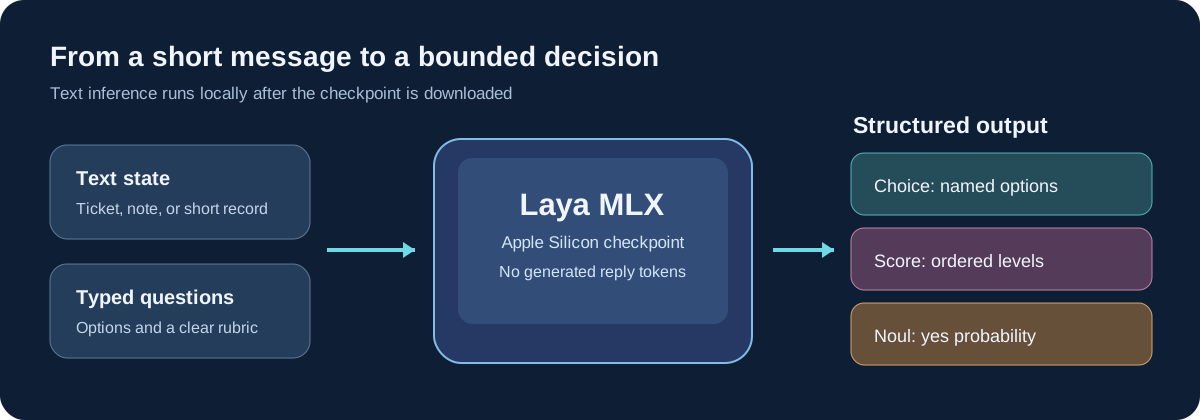
For “The export succeeded, but the downloaded file is empty,” a Choice question could pick the team, Noul could flag an unusable report, and Score could rank urgency. Each answer has a place in the workflow. If no Choice label fits, an other option avoids a forced category.
Is Laya MLX different from the original Laya model?
The answers should stay close because Laya MLX preserves the source weights and decision format. The port's validation compared its selected answers with the upstream runtime on 63 questions for each checkpoint and precision setting. They matched on those fixtures. That is a useful check that the conversion works; it is not a claim that 63 real-world decisions were all correct. FP16 probabilities can differ slightly from FP32 even when the top answer stays the same.
The original Laya project offers several checkpoints and runtimes. Laya MLX adds local loading and optional routing on Apple Silicon. It is an independent port, not an official Convai Innovations release. Recheck your own evaluation cases after changing runtime or precision.
The base English model's 512-token total context is easy to miss. That budget includes the state, instructions, and answer options. It is not 512 tokens for the customer message plus unlimited room for questions. A long support thread may be cut down before the model sees the key sentence. Short, relevant text and distinct option descriptions will usually make a fairer test than pasting the entire case history.
Which Laya MLX checkpoint should you choose?
The laya-mlx name on the reference model card points to the English 421M-parameter checkpoint. The same runtime also supports separate multilingual and specialized typed-decisions checkpoints. They are related releases, not a single model that automatically gains every capability when you install the package.
| Checkpoint used with MLX | Text and context | Good reason to test it |
|---|---|---|
laya-mlx | English; 512 tokens total | Short English triage and routing cases |
laya-multilingual-mlx | Multilingual; 1,024 tokens by default | Messages outside English or mixed-language queues |
laya-typed-decisions-mlx | Specialized; 1,024 tokens by default | Workloads similar to its published typed-decision training tasks |
Do not assume the specialized checkpoint wins everywhere. The upstream project's strong score on its typed-decisions test belongs to that specially trained release, not to the base laya-mlx checkpoint. For Chinese or another non-English language, start with the multilingual model and still test real examples. A router can choose a checkpoint, but brief messages and names can make language identification messy.
What Mac does Laya MLX need?
The published runtime calls for an Apple Silicon Mac, macOS 14 or later, and Python 3.11 or later. The first load downloads the weights. After that, inference can stay local. The English FP16 checkpoint file is about 843 MB on its model page, but file size is not the same as memory used while it runs. The project's M3 Max measurement reports about 944 MiB of peak MLX allocation for one short English question, with higher use for larger batches and full-context inputs.
If you have an 8 GB M1 Mac, those figures suggest the model is small enough to investigate, but they are not a tested guarantee for that exact machine. The published full-checkpoint measurements were made on a much larger-memory M3 Max. Leave room for macOS, your app, model loading, and other processes. Test your actual question length and batch size before promising a user that a particular Mac configuration will work smoothly.
Install the laya-mlx package, load the checkpoint, and send text with typed questions. The model card has current code. Prepare cases with known answers before judging usefulness.
Is Laya MLX faster than Laya or Jev?
The careful answer is it depends on what is being timed. In the port's detailed same-Mac benchmark, one short English question took 17.75 ms median in MLX FP16, compared with 22.70 ms in the upstream PyTorch MPS FP32 path on an M3 Max. Both paths received matching input shapes. The MLX run also changed numerical precision, so the gap cannot be credited entirely to the runtime. Longer contexts and batches had different results.
Those times include preparation, tokenization, inference, calibration, and formatting; they exclude loading and downloads. The report used one machine and repeated short inputs. Its 50-question test used a larger batch than the API default. Expect different times for your workload.
Comparing Laya MLX with Jev needs even more care. Jev is a hosted service, so an end-to-end Jev request includes network and provider behavior that a local MLX timing does not. Jev also has a much longer documented text budget. There is no fair “X times faster” conclusion from placing an M3 Max local result next to a remote Jev result. Measure the same questions from the point your user submits them, then compare answer quality as well as waiting time.
Laya MLX vs Jev vs a general chat model
All three can appear in a workflow, but they solve different parts of it. Laya MLX and Jev return bounded decisions. A chat model is better when the next step is to write an email, explain a policy, or ask a follow-up question. The table focuses on practical differences rather than a universal winner.
| Question | Laya MLX | Jev | General chat model |
|---|---|---|---|
| Main output | Choice, Score, and Noul probabilities | Typed decision probabilities | Written response or structured text, depending on the model |
| Typical input here | Short text; English checkpoint has 512 tokens total | Text or text-shaped JSON; current Jev model allows a larger request budget | Varies by model and service |
| Where it runs | Locally on a compatible Apple Silicon Mac | Hosted model endpoint | Local or hosted, depending on the product |
| What your team manages | Mac runtime, checkpoint, precision, testing | Provider connection, question design, testing | Model and prompt choices, output checks |
| Available in this site's Playground? | No | Yes, for text decisions when service is available | The site's separate AI Chat handles chat |
The Jev model reference currently lists Jev as text only, with a 64k-token request limit and an additional state-plus-longest-question constraint. That does not mean a longer request is automatically better. It does mean a long policy excerpt has a better chance of fitting intact than it would in the 512-token English Laya MLX checkpoint. Our Jev vs Laya guide discusses broader model comparisons; this article is specifically about the Mac MLX port.
When is Laya MLX worth testing?
Start with short, repeated decisions where local execution matters. A small customer-service queue, a set of agent routing choices, or a personal workflow on a Mac can make a reasonable first experiment. Keep the input text short, give each label a distinct meaning, and include a review route. You can then measure both the result and the full application time on your own machine.
With dozens of labels, option descriptions can consume the limited token budget. An optional shortlist reduces the labels considered, but needs separate testing. For an exact rule such as “refund below $10,” ordinary code may be clearer.
Confidence deserves a check too. The upstream Laya documentation notes overconfidence in some settings. A value that looks decisive is not proof the answer is right. Make a small labeled set that includes awkward wording, missing categories, and near-duplicate options. Look at wrong answers before deciding which cases can be handled automatically.
Try the same decision idea on the Jev AI homepage
You can test your question design here before setting up a Mac runtime. Open the Jev AI homepage Playground, choose Your own case, paste a short text state, and create a Choice, Score, or Yes / No question. Select Run Jev when the service is available. Then change one fact in the state and see whether the result changes for the right reason.
The homepage runs Jev, not Laya MLX. A result there cannot tell you Laya MLX's accuracy or Mac speed. It can help you write clear options, notice missing categories, and save a small set of cases to test with the local model later. Our Laya AI overview explains the wider Laya family, while the Jev examples show how to frame bounded decisions.
Laya MLX FAQ
Is Laya MLX a new model trained by Apple?
No. It is an independent MLX port of Laya for Apple Silicon. The referenced English checkpoint preserves Convai Innovations' original learned weights. Apple Silicon is the hardware target, not the model's developer.
Does Laya MLX work without the internet?
The package and checkpoint need to be obtained first. After that, inference can run locally without a hosted model call. Whether your whole application works offline depends on its other features.
Is laya-mlx good for Chinese text?
The linked aac6fef/laya-mlx checkpoint is the English release. The separate multilingual MLX checkpoint is the sensible starting point for Chinese, and its answers still need language-specific testing.
Does Laya MLX generate answers or images?
No. It scores defined text decisions and returns probabilities. Use a writing or image model if the task is to create new content.
Can I compare Laya MLX and Jev on this site?
You can run Jev text decisions in the homepage Playground and keep the same state and question for a separate Laya MLX test on a compatible Mac. The site does not currently run Laya MLX, so its result must be measured outside this Playground.
Keep exploring
 Model Comparisons
Jev vs Laya explained: compare typed outputs, open weights, context, benchmark results, and practical trade-offs. Explore Jev decisions in the Jev AI homepage Playground.
 Model Guides
What is OmniJev? A plain-English guide to its visual decision features, 0.8B, 2B, and 4B models, real limits, and how it compares with Jev and Jev-Omni.
 Model Guides
A plain-English guide to Winnow-12B, its local typed decisions, Q8 and BF16 builds, vision support, JevBench results, and how it compares with Jev.
 Model Comparisons
Compare Jev AI, Djev, Laya, OpenJev, and SemIf through real decision tasks: typed answers, images, local control, probability quality, and setup effort.
Explore Jev AI
See a Jev decision in context.
Open the homepage Playground, compare an example, and turn your own text into a focused question when the live option is available.
Open the Jev AI Playground