 Jev AI
What Is OmniJev? Visual Decisions Without Long AI Replies
What is OmniJev? A plain-English guide to its visual decision features, 0.8B, 2B, and 4B models, real limits, and how it compares with Jev and Jev-Omni.

Picture a phone screen with three buttons and a small warning banner. An assistant could describe the whole screen in a paragraph. Your app may need something narrower: which button should be tapped, is the warning real, and should the action wait for a person? OmniJev is designed for that kind of decision. It looks at visual evidence, answers questions you have already defined, and gives probabilities instead of a long reply.
People searching for OmniJev ask practical questions. Is it a new Jev model? Does “omni” mean raw audio and every video frame? Which size is worth testing? Does a robot demo prove an autonomous agent? The published interface and evaluations have clear limits.
What is OmniJev?
OmniJev is an open multimodal decision model built on Qwen3.5 vision-language backbones. The current v1.1 release has 0.8B, 2B, and 4B versions. You give it a state, such as a screenshot or sampled video, plus specific questions. It returns a small, structured answer for each question. It is not an image generator, a chat companion, or an official upgrade to TypeSafe AI's Jev.
Take a delivery photo of a box beside a front door. You ask, “Is the box visibly damaged?” and “Which action fits best: request another photo, send to a reviewer, or close the case?” OmniJev can return a yes probability and a probability for each action. An application can keep the final action behind a threshold or human review. The numbers do not guarantee that the photo was interpreted correctly.
The OmniJev project's release notes describe the model as a fast decision layer with no generated answer tokens. It can evaluate several questions about the same state in one forward pass. That is different from asking a chat model to write a separate explanation for each button, risk, or status check. A short reply does not make the problem simple, though: someone still has to choose good questions and test the results.
How does OmniJev answer a question?
OmniJev uses three question types. Choice picks among named options and includes an abstain probability for “none of the above.” Noul is a yes/no-style statement, such as “This screen contains an error message.” Score chooses a level on an ordered scale, such as low, medium, or high risk. The names may sound technical, but the pattern is familiar: show the evidence, define what you need to decide, and read the bounded result.
For a phone checkout screen, one request could ask which control should be used next, whether an error dialog is present, and how irreversible the action is. The model reads the screen once and answers those related questions together. A choice can point at image regions using boxes, so an option can mean “the blue button in this area” rather than a vague label that appears twice on the page. Boxes use coordinates normalized to a 0–1000 range in the published interface.
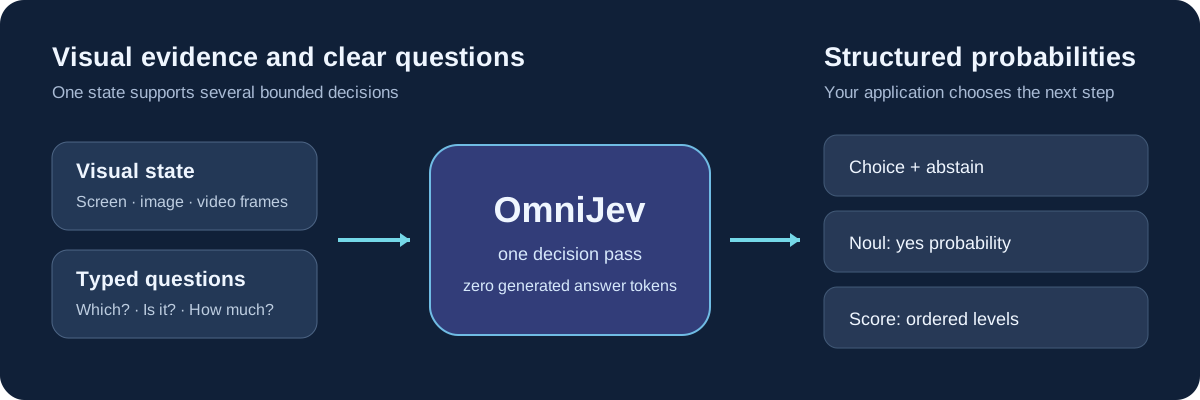
That workflow works best when the choices are distinct. “Continue,” “next,” and “proceed” may all describe the same action, making any score hard to interpret. “Open order details,” “request a clearer image,” and “send to a person” give the model a fairer test. Keep a way to stop when the evidence is missing; an abstain value only helps if your application actually respects it.
What can OmniJev see?
Screens and images are the most direct fit. OmniJev can inspect a web page, phone screen, game frame, robot camera view, or ordinary photo. You might ask whether a dialog blocks a task, which region contains a control, or whether a hazard is visible. These are examples of questions for evaluation, not promises that the model will operate a browser or robot safely on its own.
Video is sampled into 16 timestamped frames in the project's reference path. The model can answer a question about the sampled clip, such as whether a person opened a door or which action is underway. It cannot inspect every moment between those frames. If a crucial event lasts only an instant, the frame sampling strategy may miss it. For longer clips, the chosen frames also become part of what you must evaluate.
Audio is represented as an image of a spectrogram in the published demonstrations. That is a picture of sound patterns, rather than the same thing as sending a voice file through a native speech-understanding path. This matters when comparing OmniJev with a model that accepts an audio file directly. A spectrogram may help with bounded sound questions, but it should not be presented as full speech transcription or general listening ability.
Text can supply context as well. A screen without the user's goal can be ambiguous: the same “Delete” button might be relevant in one task and dangerous in another. Brief, specific context can make a decision more meaningful. If your task is only text, however, a visual model may add setup you do not need.
OmniJev 0.8B, 2B, and 4B: which version matters?
The three released OmniJev models share an API and decision format, but use different Qwen3.5 backbone sizes. The small versions are useful for checking whether a task is feasible under tighter hardware limits. The 4B version has the strongest overall score in the project's current 30-family summary. That does not mean it wins every family or that the smallest release is always too weak for a narrow task.
| OmniJev release | Backbone | Published 30-family macro accuracy | Sensible first test |
|---|---|---|---|
| OmniJev-0.8B | Qwen3.5-0.8B | 64.52% | A narrow task where model size is a real constraint |
| OmniJev-2B | Qwen3.5-2B | 64.46% | A middle-size candidate, tested against your own cases |
| OmniJev-4B | Qwen3.5-4B | 70.00% | The strongest overall published starting point |
Those figures come from the project's v1.1 score report, not from a single universal “OmniJev benchmark.” Each family contributes equally to macro accuracy, while the questions and media differ by family. The reported 0.8B and 2B averages are almost identical, but they need not make the same mistakes. If your app needs to spot a phone error banner, a broad average over games, robots, video, and text is much less useful than labeled examples of phone screens.
The published checkpoint is also an adapter and decision heads used with its matching backbone. A small adapter download is not the complete runtime cost. Plan for the correct base model, visual preprocessing, and suitable inference hardware when judging whether local use is practical. Check the released code and model card for the exact version you intend to test.
How should you read OmniJev's benchmark claims?
OmniJev's results are promising enough to make a closer look worthwhile. The 4B model's 70.00% macro accuracy covers 30 task families and 41,975 questions in the project report. The same table lists 64.52% for 0.8B and 64.46% for 2B. It also reports confidence calibration measures, but an average calibration gap does not mean every single “90%” prediction is right nine times out of ten in your product.
The project is candid about important limits. Its base-model and OmniJev rows were not evaluated on perfectly matched inputs and samples. Some v1.1 examples use multi-image panels while earlier baselines used only the first still. One multiple-choice family was withdrawn after a label defect. The 4B model also scores below its base model on the reported POPE and LongVideoBench rows. For that reason, the broad average should start a conversation about testing, not end it.
The short robot, phone, web, and game clips need similar care. The release calls its latest demonstrations offline replays of recorded trajectories. They show what the decision interface can output at particular states; they do not establish reliable closed-loop control, where the model acts, sees the consequences, and handles surprises. Some demo inputs may overlap training. If you are considering automation, test unseen examples and measure what happens after a wrong choice, not just how convincing a replay looks.
The repository includes timings from an earlier release on a particular GPU, but those are not new v1.1 speed benchmarks. A product also spends time preparing images, sampling video, and applying a policy. Measure the full path for your own media.
OmniJev vs Jev vs Jev-Omni
The names are close, yet these are separate projects with different inputs and operating assumptions. Jev is TypeSafe AI's hosted decision model and currently accepts text or text-shaped data. OmniJev is the smaller open Qwen3.5 visual decision line discussed here. Jev-Omni is an independent Gemma 4 12B IT classifier with text, image, native audio-file, and sampled-video routes. Similar output ideas do not imply shared weights, ownership, or interchangeable results.
| Practical question | OmniJev | Jev | Jev-Omni |
|---|---|---|---|
| What does it inspect? | Text context, images, screens, sampled video; audio experiments use spectrogram images | Text or text-shaped JSON | Text, one image, short audio file, or sampled video |
| What does it return? | Choice, Noul, or Score probabilities; Choice can abstain | Typed decision probabilities | Option probabilities for bounded decisions |
| What is the model path? | Open 0.8B, 2B, and 4B adapters plus matching backbones | Hosted provider model | Open Gemma-based 12B model |
| Can it run in this site's current Playground? | No | Yes, for text decisions when service is available | No |
The comparison above follows the Jev model reference and the Jev-Omni model card. Our separate Jev-Omni guide goes into its media limits. The easiest way to choose is to start with the evidence: if the deciding fact is a sentence in a ticket, test a text decision; if it is only visible on a screen, plan a visual evaluation. Do not compare scores from different datasets as though they were a race on one test.
There is also an unrelated PlayJev project under a GitHub organization named OmniJev. It focuses on a small game-playing model. When searching for “OmniJev GitHub,” check the repository author and model card before using a benchmark or setup guide; the v1.1 0.8B/2B/4B project described here is tinnel123666888/OmniJev.
Try the decision format on the Jev AI homepage
You can test the core question-writing idea on this site today. Open the Jev AI homepage Playground, choose Your own case, and describe a real situation in text. For the phone-screen example, write what the screen shows and ask, “What should happen next?” Give it clear choices such as Open order details, Ask for confirmation, and Send to review. When Jev is available, run the case, change one fact, and see whether the decision changes in a way you can explain.
This is a Jev text test, not OmniJev inference. The current Playground does not run OmniJev or inspect your screenshot, clip, or spectrogram. It is still a useful first step: you can settle the question, choices, and review rule before collecting visual examples. Our What Is Jev? guide explains the decision types, and the examples page shows how to frame practical cases. If a later OmniJev evaluation is needed, keep the decision wording consistent and add media-specific tests.
OmniJev FAQ
Is OmniJev the same as Jev-Omni?
No. OmniJev v1.1 is the Qwen3.5-based 0.8B/2B/4B project. Jev-Omni is a separate Gemma 4 12B IT project. Both answer bounded decision questions, but their input paths, weights, and published evaluations differ.
Does OmniJev listen to audio files?
The published OmniJev audio examples use spectrogram images. That is not the same as a native audio-file interface or speech transcription. Check your exact sound task with labeled examples before calling it an audio solution.
Can OmniJev drive a robot or play a game by itself?
The public clips demonstrate decisions on recorded states. The maintainers say reliable closed-loop gameplay and robot control have not been established. A control system needs tests for repeated actions, unexpected states, and safe stopping.
Should I pick OmniJev-4B automatically?
The 4B release leads the project's overall 30-family average, but your task may be narrower and your hardware may matter more. Compare all realistic candidates on the same unseen cases, then look at mistakes and confidence as well as average accuracy.
Where can I try a Jev-style decision now?
Go to the Jev AI homepage Playground and try a text case with clear options. It runs Jev when available, so the result is useful for designing a decision workflow but is not a test of OmniJev's visual abilities.
Keep exploring
 Model Guides
What is Jev-Omni? Learn how this open multimodal decision model handles text, images, audio, and video, how it compares with Jev and Djev, and what to test first.
 Model Guides
What is Laya MLX? Learn how the Apple Silicon port handles typed decisions, where its speed claims come from, and how it compares with Laya and Jev.
 Model Guides
A plain-English guide to Winnow-12B, its local typed decisions, Q8 and BF16 builds, vision support, JevBench results, and how it compares with Jev.
 Model Comparisons
A practical Jev vs Decider-4B guide to the v2 benchmark result, model versions, decision quality, local deployment, and a fair test in the Jev AI Playground.
Explore Jev AI
See a Jev decision in context.
Open the homepage Playground, compare an example, and turn your own text into a focused question when the live option is available.
Open the Jev AI Playground