 Jev AI
Jev-Omni: Four Input Types, One Clear Decision
What is Jev-Omni? Learn how this open multimodal decision model handles text, images, audio, and video, how it compares with Jev and Djev, and what to test first.

Imagine a customer sends a photo of a damaged delivery instead of writing a detailed complaint. Your app still needs a small, useful answer: does the picture show visible damage, and should a person review the case? That is the sort of question behind searches for Jev-Omni. People want to know whether the model can read more than text, whether its numbers are dependable, and how much work it takes to use in a real product.
Jev-Omni is an independent multimodal decision classifier by akhilaaa3. It takes a situation, a question, and answer options, then returns a probability for each option. Its published model card describes text, image, audio, and video input. It does not write a reply or explain its choice in a paragraph. The similar names can be confusing: Jev-Omni is not an official release of TypeSafe AI's Jev. If you want to test the Jev decision format now, open the Jev AI homepage Playground and try a text case of your own.
What is Jev-Omni?
Jev-Omni builds on Gemma 4 12B IT. Its author reports a 30,000-question fine-tuning run and publishes a decision head that scores the options supplied with a request. For a question such as “Which team should handle this?” the application could provide Billing, Shipping, and Needs Review. Jev-Omni returns a distribution over those answers. Software can read the values directly instead of trying to extract a label from a generated sentence.
The open model uses the same general idea as typed decision systems: keep the answer space explicit. Its card describes yes/no, choice, and score questions. A yes/no question might ask whether a voice message contains a cancellation request. A choice question might select the right queue for a photographed form. A score question could place a short clip on an ordered quality scale. The result is useful only if the question and options are clear enough that a person could also apply them consistently.
The word multimodal refers to the input. Jev-Omni does not produce an image, voice recording, or edited video. It looks at supplied media to choose among answers. That distinction matters when someone searches for “Jev-Omni video model” expecting a video generator. A decision about a clip and a new clip are very different outputs.
What can Jev-Omni read?
Text is the simplest case: an email, ticket, or short record becomes the state. The model card's text speed example used roughly 2,000 tokens, but that measurement is not a published promise that every much longer document will work equally well. If the decision depends on one sentence in a large document, extract the relevant passage before testing.
Images let Jev-Omni inspect the picture directly. You might ask whether a parcel label is legible or whether a product photo shows a missing part. The published usage accepts one image per request. A photo can still hide the crucial fact behind glare, blur, or an awkward angle, so include those cases in a real evaluation. Do not treat “image accepted” as proof that the model understands every visual detail.
Audio can help with a short voice note. The author caps it at 30 seconds and requires audio processing support in the runtime. For example, a support desk could ask whether the speaker requests a refund or merely asks about a charge. If a recording is longer, has multiple speakers, or is noisy, test how your preprocessing changes the result rather than assuming the first clean sample represents all callers.
Video is handled by sampling 16 frames. That can support a bounded question about a short clip, such as whether an item appears damaged. It is not a continuous account of every frame or every event between samples. A model might miss a brief action that occurs between selected frames. For time-sensitive events, frame selection is part of the application design, not an invisible detail.
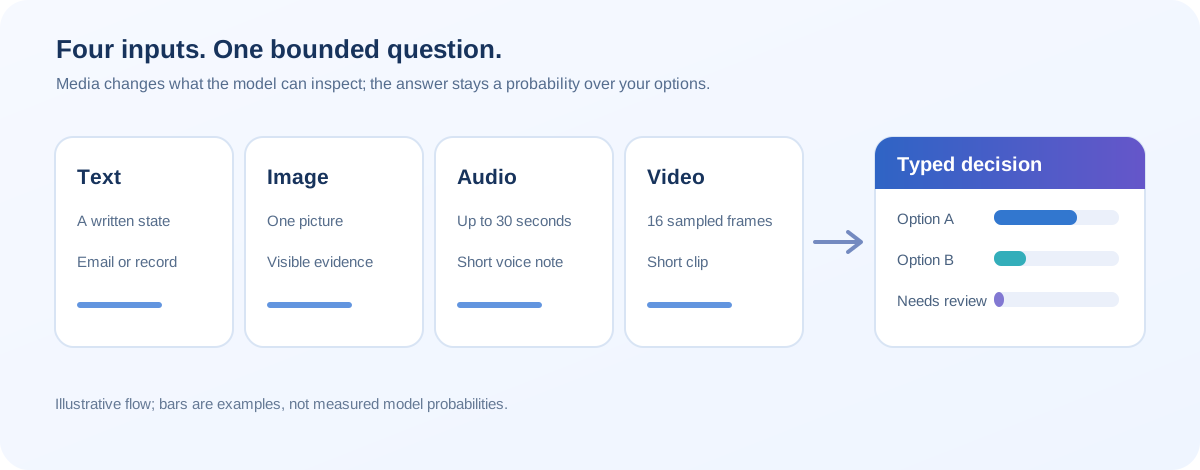
The four routes share one practical rule: define what evidence would count as uncertain. A blurry photo or a clipped sentence may deserve Needs Review rather than an automatic decision. The model card is the primary source for Jev-Omni's supported inputs and limits.
Jev-Omni vs Jev vs Djev
These names point to different projects. Jev is TypeSafe AI's hosted text decision model. Djev is an independent DiffusionGemma-based decision system with text and image paths. Jev-Omni is an independent Gemma-based classifier whose published interface also covers short audio and sampled video. None should be presented as a version upgrade of another.
| Question | Jev-Omni | Jev | Djev |
|---|---|---|---|
| What does it return? | Probabilities over supplied options | Typed Choice, Score, or Noul decisions with probabilities | Typed Choice, Score, or Noul decisions with probabilities |
| What can it inspect? | Text, one image, audio up to 30 seconds, or video sampled to 16 frames | Text or text-shaped JSON | Text, images, image options, and sampled camera frames |
| Who operates it? | You run the open weights and inference code | A hosted provider serves the model | Hosted preview or self-hosted runtime |
| What is the main setup cost? | A substantial CUDA machine and media preprocessing | A valid provider route and a well-designed request | A provider route or a substantial local GPU setup |
| Can you run it in this site's Playground? | No | Yes, for text cases when the service is available | No |
Jev is the easiest of these three to try on our site because the homepage Playground already supports Jev text decisions. TypeSafe's model reference lists Jev 1.13 as text-only. Djev's own project documentation describes images and camera sampling, but sampled frames do not give it continuous video memory. Jev-Omni's distinguishing feature is its published four-input interface, especially short audio and sampled video.
There is another comparison worth making: a general multimodal chat model can often describe an image or draft a response. Jev-Omni instead gives a bounded answer and a probability distribution. If a customer needs a compassionate email, use a writing model or a person after the decision. If your app needs to choose a queue or flag an item for review, a typed result can be easier to handle. A fixed output shape does not make the underlying judgment automatically correct.
What do the published results actually show?
The Jev-Omni model card reports 87.57% equal-weight accuracy on its DecisionBench Medium scenarios and 86.15% on a matched subset of JevBench groups. It also reports 63.10% on an audio benchmark and 53.10% on a set of video tasks. Those figures describe different datasets and question types; they are not four scores on one common scale. The JevBench subset contains 231 decisions, so its percentage should not be read as the model's overall leaderboard position.
The separate JevBench v1.4.1 evaluation now includes Jev-Omni on its own text-decision protocol. It reports a composite score of 51.3, compared with 63.3 for Jev 1.13.0. That composite mixes decision quality, calibration, speed, and estimated cost. It says something useful about a particular text workload, but it does not measure whether Jev-Omni is better at recognizing damage in photos or intent in short recordings. The model card's matched-subset accuracy and the independent composite cannot be placed in one ranking column.
Speed claims need the same care. The author reports warm H200 medians of 83 ms for text, 26 ms for one image, 31 ms for a short audio clip, and 504 ms for sampled video. These figures exclude preprocessing and network time and cover only 20 requests per setting. A phone upload, audio conversion, model loading, and a busy queue can make a real user wait longer. Measure from the point where your application receives the case to the point where it has a usable answer.
The card also reports a calibration measure on its own test data. That is encouraging but does not prove that a 0.9 probability in your product will be right nine times out of ten. New lighting, accents, categories, and policy wording can shift the data. If you plan to act automatically above a threshold, check that threshold on labeled examples from your own users.
What should you plan for before using Jev-Omni?
The reference loader requires a CUDA GPU. The model card says its FP32 files take roughly 50 GB before runtime overhead, although a separate unified BF16 demo uses a smaller packaged checkpoint. Hardware needs depend on the exact files and loader you choose. This is not a model to assume will run cheaply in a browser tab or on an ordinary laptop.
The classification head can represent up to 256 options, but the author says quality is best supported at 20 or fewer. If you have 80 support queues, do not simply paste them all into one question and expect the same result as a three-option example. Group the categories, write distinct descriptions, and test the option count you intend to ship. Keep a review option for cases that fit none of them.
The model code and weights are marked Apache-2.0, while the model card says training-data rights are separate. If your team needs to redistribute the model or use it under specific commercial terms, review the relevant notices. For most readers, the immediate practical issue is simpler: decide whether operating a large local model is justified by the media tasks you actually have.
Try the decision idea on Jev AI first
You can test the shape of the task without a large GPU. Open the Jev AI homepage Playground, choose Your own case, and write a text version of a real decision. For a damaged delivery, paste the customer's description and ask: “Which next step is appropriate?” Give it choices such as Request a clearer photo, Send to a reviewer, and No visible issue reported. When Jev is available, run the case, then change one fact and see whether the answer changes for the right reason.
This tests Jev, not Jev-Omni. The current site does not accept a photo, audio file, or clip for Jev-Omni inference. It still helps you write a clear question and a useful answer list before investing in a multimodal setup. Save the wording and expected answers; if you later evaluate Jev-Omni elsewhere, keep the text cases identical and add media cases separately. Our What Is Jev? guide explains the decision types, while the Jev vs Djev guide covers another route for image-based decisions.
Jev-Omni FAQ
Is Jev-Omni an official Jev model?
No. Jev-Omni is independent work by akhilaaa3, built on Gemma 4 12B IT. TypeSafe AI's Jev is a separate hosted model. Similar decision formats do not mean shared weights or ownership.
Is Jev-Omni the same as OmniJev?
No. OmniJev is used by separate visual-decision projects. Jev-Omni in this article is the akhilaaa3/Jev-Omni model. Check the author and model card when a search result uses the words in a different order.
Can Jev-Omni explain why it chose an option?
Its published classifier returns option probabilities, not a generated explanation. Your application can show the input and the decision rubric to a reviewer, but it should not invent an explanation and present it as the model's reasoning.
Should I choose Jev-Omni for every decision?
Use the input that matters. For a text-only queue, start with a simpler Jev case on the homepage Playground. Jev-Omni becomes interesting when the decision truly depends on pixels, sound, or sampled frames and you can support its runtime. Test the exact task before automating an action.
Jev-Omni is a useful example of how typed decisions can move beyond text. Its four input routes widen the kinds of questions you can ask, while its media limits, hardware needs, and uneven benchmark scopes keep the choice practical. Begin with one clearly defined decision on the Jev AI homepage; let your real cases tell you whether a multimodal model is the next step.
Keep exploring
 Model Comparisons
Compare Djev and Jev for typed AI decisions: text and image inputs, speed, probability quality, deployment, and the right way to test them on your own cases.
 Model Comparisons
A practical Jev vs JevK5 guide covering typed answers, open weights, input limits, published tests, and how to try a real decision in the Jev AI Playground.
 Model Guides
What is Laya AI? Explore its three open-weight decision checkpoints, typed answers, language routing, practical limits, and how it compares with Jev.
 Model Comparisons
Jev vs Laya explained: compare typed outputs, open weights, context, benchmark results, and practical trade-offs. Explore Jev decisions in the Jev AI homepage Playground.
Explore Jev AI
See a Jev decision in context.
Open the homepage Playground, compare an example, and turn your own text into a focused question when the live option is available.
Open the Jev AI Playground