 Jev AI
Jev AI vs Djev vs Laya vs OpenJev vs SemIf: Five Practical Trade-offs
Compare Jev AI, Djev, Laya, OpenJev, and SemIf through real decision tasks: typed answers, images, local control, probability quality, and setup effort.

A customer writes, “I was charged twice, but my order never arrived.” Your app needs to decide whether to send the case to Billing, Shipping, or a person who can look at both. A chat model could write a long explanation. A decision model gives your software a choice it can use, often with a probability for each allowed answer. That small difference explains why people are searching for Jev AI vs Djev vs Laya vs OpenJev vs SemIf.
The searches and community discussions tend to circle around four practical questions: Can I run it locally? Can it look at an image? Can I trust a reported 90% confidence? And how much work is required before it helps my own application? This guide answers those questions without treating a leaderboard as a shopping list. If you want to feel the format before reading further, the Jev AI homepage Playground lets you try a text decision with your own case when the service is available.
What do these five systems actually do?
All five work with a state—the facts the model sees—and a bounded question. You might ask for a Choice among named teams, a Score on an ordered urgency scale, or a Noul yes/no judgment. Instead of drafting a reply, the system returns an answer that code can inspect. The shared vocabulary makes comparison easier, but it does not make the systems identical or interchangeable.
Jev AI is the hosted starting point. TypeSafe AI's Jev model accepts text or text-shaped JSON and returns typed decisions and probabilities. Its published Jev 1.13 documentation describes a 64,000-token total request budget, with a separate 32,000-token limit for the state plus the longest question. Those limits are useful when a support decision needs a policy excerpt and conversation history. Jev does not read raw images, audio, or video; visual facts have to become text first.
Djev takes a different route through Google's DiffusionGemma. The independent Djev runtime reads the scores of allowed answer labels and supports text as well as images, including image options. Its camera feature samples frames into image requests; it should not be confused with continuous video understanding. Djev is interesting for questions such as “Is the warning light on in this photo?” Its published probabilities are experimental, so an automatic threshold needs careful testing.
Laya is a smaller open-weight family from Convai Innovations. Its English and multilingual checkpoints use encoder models; the project also publishes a checkpoint fine-tuned for typed-decision workflows. You can run it on your own hardware and train it for a narrow task. That is attractive for a fixed queue taxonomy or private data. Its own documentation is candid about the trade-off: the base checkpoints are weak on its typed-decisions benchmark without task-specific training. Laya's relatively short input windows also make long policy files a poor direct fit.
OpenJev here means the razorback16/openjev server, the same project discussed in our OpenJev guide. It is an independent, open-source implementation of a Jev-style request shape. Its main path runs DiffusionGemma and can take images; the repository also describes NVIDIA and Apple silicon serving, optional extra reasoning steps, and routes for smaller models. A familiar API shape can lower the effort of an experiment, but it does not copy Jev's weights or its probability behavior.
SemIf is a separate project that was formerly called OpenJev. That old name is the source of many confusing search results. In this comparison, SemIf means the TheoLeeCJ/SemIf-OpenJev project: a method that reads option probabilities from an open model such as Qwen3.5-4B without generating an answer sentence. It is best understood as an open scoring approach and toolkit, not one fixed set of specially trained SemIf weights. The team running it chooses a backbone, hardware, and a calibration process.
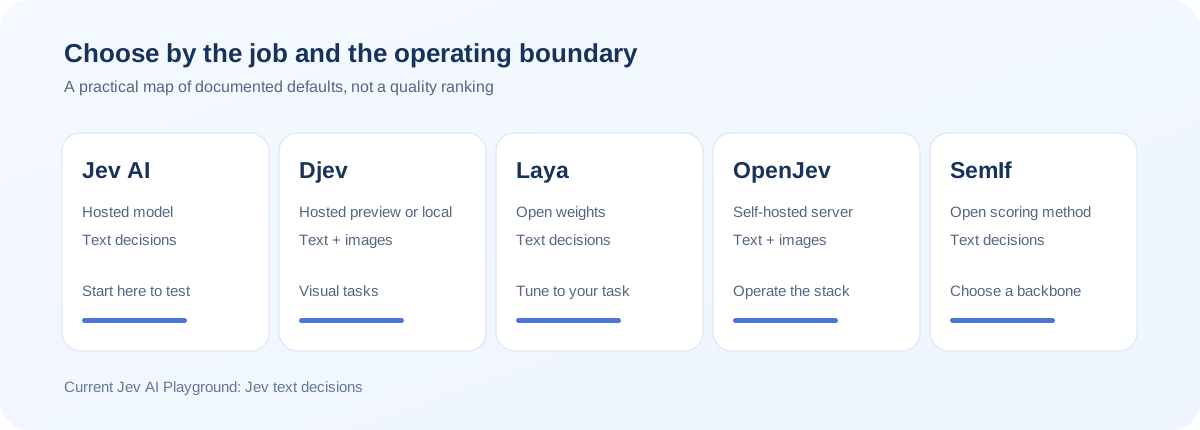
Jev AI vs Djev vs Laya vs OpenJev vs SemIf at a glance
| System | Main attraction | Input to evaluate | Where it runs | Main work left to you |
|---|---|---|---|---|
| Jev AI | Managed typed text decisions | Text or text-shaped JSON | Hosted service | Write clear questions and validate your workflow |
| Djev | Direct image decisions and fast inference design | Text, images, and sampled camera frames | Hosted preview or an open runtime | Test visual edge cases and probability thresholds |
| Laya | Open weights and task-specific training | Text; checkpoint limits vary | Your CPU or GPU | Pick a checkpoint, fine-tune when needed, and calibrate |
| OpenJev | Jev-style server with local control | Text and images on its main DiffusionGemma path | Your NVIDIA GPU or Apple silicon | Operate the server and test every configuration |
| SemIf | Direct option scoring with open backbones | Primarily text in the documented scorer | Your chosen local runtime | Select a backbone, serve it, and fit confidence to your data |
These are systems, not five releases of one model. “OpenJev” is especially easy to misread because SemIf previously used the name, while the razorback16 server is a distinct project. The table describes each project's documented path as of September 2026. Check the exact version and runtime before putting a claim into a product plan.
Which differences matter in a real decision?
Text-only work: start with the question, not the model name
Suppose a university help desk needs to route “I can't access my course after paying the fee.” Give each system the same message, the same question, and the same options: Account Access, Payments, Course Support, and Needs Review. If one option description is vague, you will get a vague comparison. No model can repair a category list that puts the same problem in two places.
Jev AI is the easiest place to try this on our site because the homepage Playground already presents the decision format. Laya may appeal when you have hundreds of labeled help-desk tickets and want a small local model tuned to those categories. SemIf makes sense when you already operate an open model and want to read its option scores. OpenJev is more relevant if you want to keep a Jev-style API while running your own server. Djev can also answer text questions, but its visual input is the feature that most clearly changes this example.
Images change the shortlist
Now imagine the ticket includes a photo of a cracked laptop screen. Jev and the standard Laya text checkpoints cannot inspect those pixels directly. You could use OCR, a vision model, or a human note to turn the image into facts before asking Jev. That can be sensible if your current workflow already produces reliable descriptions, but “the model read a description” and “the model inspected the photo” are different tests.
Djev and the main OpenJev path document native image inputs. Test them with the photos users actually upload: glare, low light, several objects in one frame, and a picture that fails to show the needed detail. A model that can accept an image is not automatically good at your particular visual judgment. Also check whether an image feature belongs to the checkpoint, the server, or only a demo; those boundaries matter when you build the application.
A probability is useful only after you check it
Say the top answer is Billing at 0.9. That number feels reassuring, yet it is useful for an automatic route only if similar 0.9 predictions are right roughly nine times out of ten on your cases. Jev is built around calibrated decisions, but its probabilities still need local validation. Djev labels its probabilities experimental. Laya documents calibration limitations in shipped checkpoints. SemIf provides ways to fit calibration per workload. OpenJev's confidence calculation describes how concentrated its option distribution is; concentration alone does not prove correctness.
This is why a small labeled test set can beat a long argument about benchmarks. Keep the result and the expected answer for each case. Group cases by predicted confidence, then count errors within each group. If a wrong answer can block an account or move money, include a Needs Review path and keep hard rules in ordinary application code. A decision model should help interpret messy facts, not grant itself authority to bypass your rules.
Local control comes with an operations bill
An open license does not make serving free. Laya needs a chosen checkpoint, memory, and monitoring. SemIf depends on the open model and runtime you pick. OpenJev's main DiffusionGemma setup calls for much larger hardware than Laya's small encoder checkpoints. Djev's open runtime also has substantial GPU requirements. Jev's hosted route removes most of that serving work but puts requests across a provider boundary.
For steady traffic, local serving can be worth the effort. For a first prototype, installation and tuning may cost more than the requests. Privacy can settle the issue before price does: if raw data must stay on your machines, test a local option from the start. Otherwise, measure the full response from your application, including network time, rather than comparing GPU milliseconds with a browser wait.
What do the published comparisons tell us?
The JevBench project offers a useful shared set of typed-decision tasks. Its rankings have changed as the method added fresh, sealed questions. That is a good reason to cite a version and the exact task set whenever someone claims that one model is “number one.” An overall score blends accuracy, calibration, speed, and cost; it cannot tell you whether your refund queue or product photos will work.
Laya's reported strong typed-decisions result comes from a checkpoint trained on that task's training split; its base checkpoints perform much worse there. Comparing that result with a zero-shot Jev call ignores the preparation difference. SemIf has several backbones and execution modes, so “SemIf speed” needs a model name and hardware description. Treat demos and community tests as ideas to test, not guarantees.
A simple comparison you can run today
Start with 30 to 50 labeled examples. Include clear requests, mixed requests, missing information, and cases where the right answer is Needs Review. Freeze the question and options before comparing systems. Record the model version, selected answer, probabilities if available, elapsed time from your app, and whether the expected answer was returned.
Look at mistakes rather than only the final percentage. Did the model ignore a negation? Did changing the order of options change the answer? Did two teams get similar probabilities? Did a photo omit the feature that the question asked about? Those observations often suggest a better rubric, a review route, or an earlier text-extraction step. They also tell you which model difference matters for your product.
You can do the first pass right here. Go to the Jev AI homepage Playground, choose Your own case, paste one of your text examples, and ask a Choice, Score, or Yes / No question. When the Jev service is available, run it once, change a single fact, and run it again. Save both answers. Our What Is Jev? guide explains the three question types if you want a quick refresher. The site currently runs Jev in the Playground; the other systems in this article are comparison subjects, not selectable models here.
Jev AI comparison FAQ
Is OpenJev the same as SemIf?
No. SemIf's project formerly used the OpenJev name, but the OpenJev discussed here is the separate razorback16 server. Check the repository owner whenever you see the name in an older post.
Does Laya beat Jev AI?
There is no universal answer. Laya's fine-tuned checkpoint reports a strong result on its training-related workflow benchmark, while its base checkpoints are much weaker there. Test the exact checkpoint on your own labeled cases before drawing a conclusion.
Can I use all five systems in this site's Playground?
The homepage Playground currently tests Jev text decisions. It gives you a clean case, question, and option list that you can reuse in a separate evaluation of Djev, Laya, OpenJev, or SemIf.
The most useful choice is the one you can explain with your own examples. Jev AI gives you a quick managed way to test typed text decisions here. Djev and OpenJev broaden the conversation to images; Laya offers a compact model you can specialize; SemIf offers a flexible open scoring method. Begin with one question in the Playground, then let the errors and operating constraints—not the model names—shape your shortlist.
Technical references: Jev model documentation, Djev project, Laya project, OpenJev project, and SemIf project.
Keep exploring
 Model Comparisons
Compare Djev and Jev for typed AI decisions: text and image inputs, speed, probability quality, deployment, and the right way to test them on your own cases.
 Model Comparisons
Jev vs Laya explained: compare typed outputs, open weights, context, benchmark results, and practical trade-offs. Explore Jev decisions in the Jev AI homepage Playground.
 Model Guides
What is OpenJev? Learn how this open-source decision server turns a state and typed questions into probabilities, how it differs from Jev, and what to test before using it.
 Model Guides
What is Jev-Omni? Learn how this open multimodal decision model handles text, images, audio, and video, how it compares with Jev and Djev, and what to test first.
Explore Jev AI
See a Jev decision in context.
Open the homepage Playground, compare an example, and turn your own text into a focused question when the live option is available.
Open the Jev AI Playground